Guillermo (Guy) Yanez avatar

Hello everyone,

As you may already know, NINA includes a useful plugin called Session Metadata, which allows you to save your metadata, weather data (if available), and image session acquisition details. These files are typically named:

ImageMetaData.csv

WeatherData.csv

AcquisitionDetails.csv

This information is valuable for later analysis. This is s screenshot of the NINA plugin:

image.png.3819ce725680d05ce3aadcca259f99f1.png

I’ve developed an app that lets you upload these files (even if only partially available) and provides metrics, tables, graphs, and statistics that can help you understand your subs and make adjustments for future sessions.

You may find the latest release of my app here.

Upload the csv files created with the NINA plugin without editing to the app. It is freeware!

I’d love to hear your feedback—whether your files are read correctly and if the app is bug-free. Let me know if you encounter any issues.

I’ve also created a Help file to explain the metrics and what each tab includes.

Just as a simple example, you might notice that airmass (how high the object is in the sky) has a much greater impact on image quality than guiding RMS, as good and bad frames often share similar RMS values.

image.thumb.png.1e752ef47803b2387fdd80f678c2d124.png

In one sample session, I realized I had mistakenly added too much exposure time near astronomical dawn. It would have been better to skip that last hour and adjust my next session accordingly. The bad frames coincided with the part of the session where the sky brightened too much near sunrise.

image.thumb.png.08b98026623caeade68dfdf1cd2cad7b.png

image.thumb.png.fa38ae8e58a213f693ff4442d8682715.png

Feel free to use it and let me know what you think.

Enjoy!

Guy Yanez

Well Written Helpful Insightful Respectful Engaging Supportive
ornyx avatar

It looks very useful. I'll try it out in the next few days. Thanks for sharing.

Well Written Respectful
Tony Gondola avatar

I will certainly make use of this, thank you!

Rainer Ehlert avatar

Hi,

Thanks for drawing my attention to this. Very interesting. I see in one of your graphs you include SQM measurements.

I have an SQM running 24/7 but how can I display SQM values and my Weather values at the same time in NINA?

Thanks Rainer

Guillermo (Guy) Yanez avatar

.

Guillermo (Guy) Yanez avatar

Rainer Ehlert · Dec 27, 2025, 05:59 PM

Hi,

Thanks for drawing my attention to this. Very interesting. I see in one of your graphs you include SQM measurements.

I have an SQM running 24/7 but how can I display SQM values and my Weather values at the same time in NINA?

Thanks Rainer

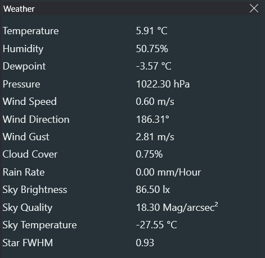
Hi. I am using the Pocket CW2 from Lunático. I am assuming it works pretty much the same with any SQM unit. Here is my own experience with SQM readings:

  • Make sure you are using the ASCOM hub for weather readings in NINA.

  • The ASCOM hub will allow you to select different online sources and devices for various metrics.

  • Select your device in the ASCOM setup for the weather hub (e.g., CW2 or Unihedron) under Sky Quality or Sky Brightness, whichever works for your setup.

  • Make sure it reads as expected in the Imaging tab. See below.

weatherOnce you start a sequence, the readings should be included in each subframe FITS header and the session metadata weather file alike. I hope this helps.

Well Written Helpful
Rainer Ehlert avatar

Gracias Guillermo,

I can either run SQM or my Weather data which comes from Weather Underground but as there is no ASCOM driver for Weather Underground, so running both is not possible.

Thanks

Rainer Ehlert avatar

Hola,

I downloaded your program Sequence Analizer v0.9, but, yes but, everytime I open it, Norton Antivirus closes it and then it starts again, even having told NortonAntivirus to run it anyway and having told NortonAntivirus to put it in the exclusion list.

Would be nice if you could do something against this

Gracias

Guillermo (Guy) Yanez avatar

Rainer Ehlert · Dec 27, 2025, 10:19 PM

Gracias Guillermo,

I can either run SQM or my Weather data which comes from Weather Underground but as there is no ASCOM driver for Weather Underground, so running both is not possible.

Thanks

Hi again. This driver might do the trick for you: https://github.com/spaceuma/ASCOM-WUAPI-ObsCon

I hope it does. Cheers!

Guillermo (Guy) Yanez avatar

Rainer Ehlert · Dec 27, 2025, 10:42 PM

Hola,

I downloaded your program Sequence Analizer v0.9, but, yes but, everytime I open it, Norton Antivirus closes it and then it starts again, even having told NortonAntivirus to run it anyway and having told NortonAntivirus to put it in the exclusion list.

Would be nice if you could do something against this

Gracias

Unfortunately, I think this is an issue on the Norton end. I Have had issues with Norton myself. It triggers false positives with some exe files created with Python modules such as this one. If the exclusion list does not work, try putting the file in the %appdata% folder or, here: C:\Users\<YourUser>\AppData\Local\.

I will attempt to add a digital signature to the executable in a future version and see if that helps. Cheers!

Well Written Helpful Concise Supportive
Rainer Ehlert avatar

Guillermo (Guy) Yanez · Dec 27, 2025, 11:10 PM

Rainer Ehlert · Dec 27, 2025, 10:19 PM

Gracias Guillermo,

I can either run SQM or my Weather data which comes from Weather Underground but as there is no ASCOM driver for Weather Underground, so running both is not possible.

Thanks

Hi again. This driver might do the trick for you: https://github.com/spaceuma/ASCOM-WUAPI-ObsCon

I hope it does. Cheers!

Hi,

Thanks for your help but this sort of pages like the link one and eg. Github are like a “closed book for me”, I never do find wahat I am looking for in this sort of database…

Son un MIsterio no Descifrable 🤣

saludos

Rainer Ehlert avatar

Rainer Ehlert · Dec 28, 2025, 01:11 AM

Guillermo (Guy) Yanez · Dec 27, 2025, 11:10 PM

Rainer Ehlert · Dec 27, 2025, 10:19 PM

Gracias Guillermo,

I can either run SQM or my Weather data which comes from Weather Underground but as there is no ASCOM driver for Weather Underground, so running both is not possible.

Thanks

Hi again. This driver might do the trick for you: https://github.com/spaceuma/ASCOM-WUAPI-ObsCon

I hope it does. Cheers!

Hi,

Thanks for your help but this sort of pages like the link one and eg. Github are like a “closed book for me”, I never do find wahat I am looking for in this sort of database…

Son un MIsterio no Descifrable 🤣

saludos

Hola,

I downloaded the following file

ASCOM_WUAPI_ObsCon Setup.exe

and while trying to run it it tells me that it can no run on my PC ¿?

📷 image.pngimage.png

kvastronomer avatar

Guillermo (Guy) Yanez · Dec 27, 2025, 09:56 PM

Rainer Ehlert · Dec 27, 2025, 05:59 PM

Hi,

Thanks for drawing my attention to this. Very interesting. I see in one of your graphs you include SQM measurements.

I have an SQM running 24/7 but how can I display SQM values and my Weather values at the same time in NINA?

Thanks Rainer

Hi. I am using the Pocket CW2 from Lunático. I am assuming it works pretty much the same with any SQM unit. Here is my own experience with SQM readings:

  • Make sure you are using the ASCOM hub for weather readings in NINA.

  • The ASCOM hub will allow you to select different online sources and devices for various metrics.

  • Select your device in the ASCOM setup for the weather hub (e.g., CW2 or Unihedron) under Sky Quality or Sky Brightness, whichever works for your setup.

  • Make sure it reads as expected in the Imaging tab. See below.

weatherOnce you start a sequence, the readings should be included in each subframe FITS header and the session metadata weather file alike. I hope this helps.

What device is giving you “Star FWHM” metric? This would be most useful for a remote observatory where you can’t see the skies with your own eyes and rely just on numbers.

Well Written
Guillermo (Guy) Yanez avatar

Rainer Ehlert · Dec 28, 2025, 02:03 AM

Rainer Ehlert · Dec 28, 2025, 01:11 AM

Guillermo (Guy) Yanez · Dec 27, 2025, 11:10 PM

Rainer Ehlert · Dec 27, 2025, 10:19 PM

Gracias Guillermo,

I can either run SQM or my Weather data which comes from Weather Underground but as there is no ASCOM driver for Weather Underground, so running both is not possible.

Thanks

Hi again. This driver might do the trick for you: https://github.com/spaceuma/ASCOM-WUAPI-ObsCon

I hope it does. Cheers!

Hi,

Thanks for your help but this sort of pages like the link one and eg. Github are like a “closed book for me”, I never do find wahat I am looking for in this sort of database…

Son un MIsterio no Descifrable 🤣

saludos

Hola,

I downloaded the following file

ASCOM_WUAPI_ObsCon Setup.exe

and while trying to run it it tells me that it can no run on my PC ¿?

📷 image.pngimage.png

Hi. I am not the owner of that ascom driver. I am not sure what is going on there. Try contacting the owner . Maybe you should try a different route and combine your SQM device (provided it has an ascom driver) and a different online source for weather such as OpenWeatherMap API using the ascom hub.

Guillermo (Guy) Yanez avatar

kvastronomer · Dec 28, 2025, 06:38 AM

Guillermo (Guy) Yanez · Dec 27, 2025, 09:56 PM

Rainer Ehlert · Dec 27, 2025, 05:59 PM

Hi,

Thanks for drawing my attention to this. Very interesting. I see in one of your graphs you include SQM measurements.

I have an SQM running 24/7 but how can I display SQM values and my Weather values at the same time in NINA?

Thanks Rainer

Hi. I am using the Pocket CW2 from Lunático. I am assuming it works pretty much the same with any SQM unit. Here is my own experience with SQM readings:

  • Make sure you are using the ASCOM hub for weather readings in NINA.

  • The ASCOM hub will allow you to select different online sources and devices for various metrics.

  • Select your device in the ASCOM setup for the weather hub (e.g., CW2 or Unihedron) under Sky Quality or Sky Brightness, whichever works for your setup.

  • Make sure it reads as expected in the Imaging tab. See below.

weatherOnce you start a sequence, the readings should be included in each subframe FITS header and the session metadata weather file alike. I hope this helps.

What device is giving you “Star FWHM” metric? This would be most useful for a remote observatory where you can’t see the skies with your own eyes and rely just on numbers.

Sorry if that was misleading, as I simply used the NINA example image. You have raised an interesting point: monitoring FWHM in real time can help interpret clouds or obstructions in your current sky. Needless to say, the Sequence Analyzer can extract information from your subs for later analysis, but that’s not useful if you need a real-time reading. You may want to contact Lunatico and ask whether the CloudWatcher or SOLO can provide real-time FWHM—the PocketCW does not.

It would be interesting to have a StarFWHM reading taken directly from subs and sent to the ASCOM Observing Conditions Hub. I’m not sure how to implement that, but it seems plausible.

Well Written Helpful Insightful
Rainer Ehlert avatar

Guillermo (Guy) Yanez · Dec 29, 2025, 11:31 AM

Hi. I am not the owner of that ascom driver. I am not sure what is going on there. Try contacting the owner . Maybe you should try a different route and combine your SQM device (provided it has an ascom driver) and a different online source for weather such as OpenWeatherMap API using the ascom hub.

It is not that important, it was just curiosity. Anyway it does not help me get a better Sky 🥴

Related discussions
DSLR Mod: Installing a Narrowband Filter Directly on the Sensor (Results Included)
Hello everyone! I wanted to share a super fun mod I did on my DSLR in case anyone is interested or has feedback — or if someone out there has tried something similar! I recently sent my main astro rig to a remote observatory, and honestly… I started ...
Dec 1, 2025
Both posts discuss modifications or enhancements to astronomy equipment for improved data collection and analysis capabilities.