Blaine Gibby avatar


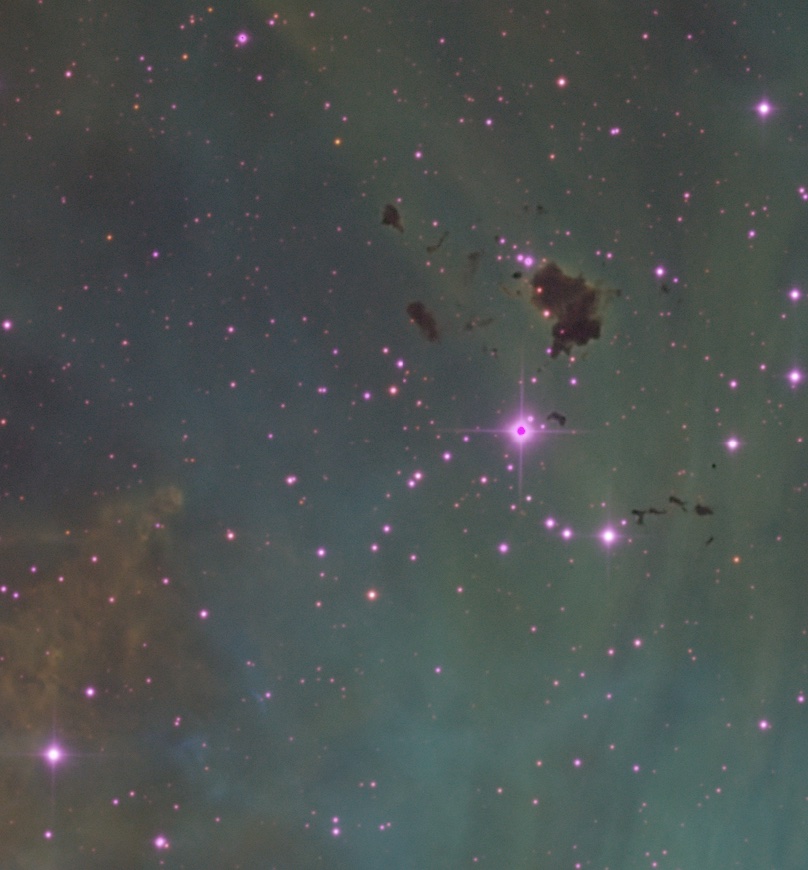
Anyone else getting weird star artifacts after BXT update? 
I am not sure if its the update or problems with the data I downloaded from telescope.net
Rob Walker avatar
Is this narrowband data? I tend to associate purple stars with data collected using SHO filters?
Walter Leonhard Schramböck avatar
Yes, I had this problem in my last LRGB image.
Oscar H. avatar
@Rob Walker  I think he's talking about the dark dot in the center of the brightest star. I'm 90% sure.
Walter Leonhard Schramböck avatar
@Rob Walker  I think he's talking about the dark dot in the center of the brightest star. I'm 90% sure.

That was exactly what I saw in my image.
Guiem Kimi avatar
Yes. I have the same problem since yesterday from the last update. I work with OSC data.
Rob Walker avatar
@Rob Walker  I think he's talking about the dark dot in the center of the brightest star. I'm 90% sure.

Ah - missed that. Will keep an eye out for it.
Paul Huntley avatar
Yep, I noticed this issue today when reprocessing data (slight change in workflow) from last week. Interesting…
Minh Lết avatar
Blaine Gibby:


Anyone else getting weird star artifacts after BXT update? 
I am not sure if its the update or problems with the data I downloaded from telescope.net

if you were refering to the purple core of the brightest star then check and see if the artifact is there before running BXT because some camera just show black pixels on overexposed part.
Steven Miller avatar
I’m getting a somewhat related artifact that I reported back to RC:  In a nebula, a couple of the centers of dusty globules were pushed almost all the way to black with an over-saturated reddish border.  I switched back to the earlier AI and it worked correctly, so clearly a new issue.
Vroobel avatar
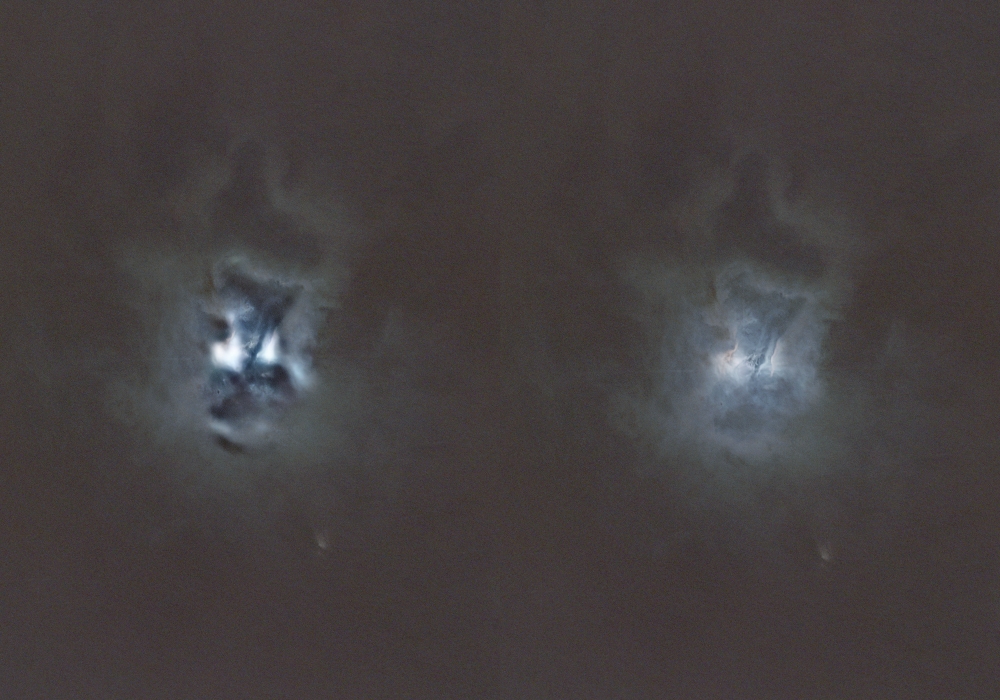
I also experienced a problem with the new version. Thankfully, we can select the AI version, so I switched to v.1 and now is much better. Below I place a piece of the Iris with v.2 and v.1, Sharpen Nonstellar: 0.9 in both cases.


Robert Eder avatar
I also experienced a problem with the new version. Thankfully, we can select the AI version, so I switched to v.1 and now is much better. Below I place a piece of the Iris with v.2 and v.1, Sharpen Nonstellar: 0.9 in both cases.


I have the same problem with the dark spots!
Tareq Abdulla avatar
Should people update BXT then? I didn't use PI since long time because no imaging and no data, but i already have BXT, i don't remember i updated it, or maybe i did within PI update itself not sure, but if i will have data to play with then i will check it out.
Vroobel avatar
Tareq Abdulla:
Should people update BXT then? I didn't use PI since long time because no imaging and no data, but i already have BXT, i don't remember i updated it, or maybe i did within PI update itself not sure, but if i will have data to play with then i will check it out.

You can choose v.1 as the temporary solution.
Chris Lamb avatar
Yes, same sort of strange behaviour for me processing some hso last night.

I gave up on it, but will try going back to v1 for now
Tareq Abdulla avatar
Tareq Abdulla:
Should people update BXT then? I didn't use PI since long time because no imaging and no data, but i already have BXT, i don't remember i updated it, or maybe i did within PI update itself not sure, but if i will have data to play with then i will check it out.

You can choose v.1 as the temporary solution.

Or not updating so i stay with old version, i hope RC can find a cure for that or something else as a solution for it.
mastermerlin avatar
There was an update to 1.17 yesterday, maybe that adresses your issues?
Robert Eder avatar
There was an update to 1.17 yesterday, maybe that adresses your issues?

No, it did not!
Adam Dudko avatar
I also experienced a problem with the new version. Thankfully, we can select the AI version, so I switched to v.1 and now is much better. Below I place a piece of the Iris with v.2 and v.1, Sharpen Nonstellar: 0.9 in both cases.


I had the same problem, the solution is to disable the automatic PSF and set the value manually. You can measure it with the FWHMEccentricity script.
Helpful Concise
Robert Eder avatar
Adam Dudko:
I also experienced a problem with the new version. Thankfully, we can select the AI version, so I switched to v.1 and now is much better. Below I place a piece of the Iris with v.2 and v.1, Sharpen Nonstellar: 0.9 in both cases.


I had the same problem, the solution is to disable the automatic PSF and set the value manually. You can measure it with the FWHMEccentricity script.

Thanks Adam!👍😀
Dionysus avatar
I solved this problem by disabling "Luminance Only".  I was previously using that setting as I didn't like the way the star colours were changing without it, but I notice that after the update they are handled much better now with it disabled.  I was already using manual PSF.  Hope this helps.
Well Written Concise
Jerry Gerber avatar
I processed this image of M13 last night after downloading the latest version of BXT and I don't see any star artifacts.. 
​​​​​
https://www.astrobin.com/full/67jzj9/0/
Markus Figel avatar
Robert Eder:
Adam Dudko:
I also experienced a problem with the new version. Thankfully, we can select the AI version, so I switched to v.1 and now is much better. Below I place a piece of the Iris with v.2 and v.1, Sharpen Nonstellar: 0.9 in both cases.


I had the same problem, the solution is to disable the automatic PSF and set the value manually. You can measure it with the FWHMEccentricity script.

Thanks Adam!👍😀

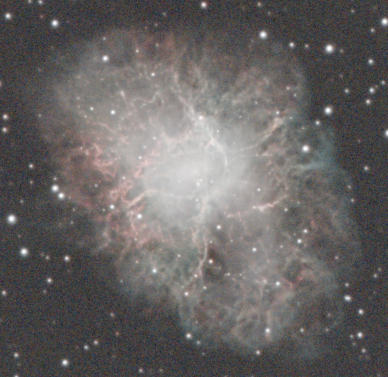
tried it with an OSC picture of M1 in linear stage, same dark areas and color changes as can be seen above. Used  the FWHMEccentricity Script  and manual PSFl... no positive effect (no other option selected), so Adam's advice is no solution for me.

going back to AI version 1 works at least to get the black areas gone.

Used a L-mask before BXT. this worked but makes the BXT less effective.

Here are some versions, with standard parameters 0.25, 0, automatic psf and 0.9 non stellar (manual psf shows no big effect)

version before update:                                                                             with AI version 1


version with Luminscence mask                                                    new version 1.17


the result depends strongly on the amount of background in the picture!  As more you crop as better is the result! You can try it with different previews.

So no solution for me up to now.....

regards
Markus
GergoB avatar
Blaine Gibby:


Anyone else getting weird star artifacts after BXT update? 
I am not sure if its the update or problems with the data I downloaded from telescope.net

Only have this issue when Luminance Mode is enabled. I've been using BXT without Lum mode without issues.
Paul Huntley avatar
Unchecking this checkbox resolved issues for me as well.
Related discussions
Can't tell if this red is artifact or is really there...
I processed my image of the Markarian's chain in HaLRBG. Markarian's chain in HaLRBG I get this weird red area between the galaxies. Its not clear to me if this is real or artifact. I don't see it in any other images of the Markarian'...
Discusses artifact identification in processed astronomical images from telescope data.
Mar 11, 2025
Can we somehow Remove this weird Lightning From The Image?
Hello and welcome! I would like to ask everyone who uses Siril to process their astrophotography images: Is there any way to remove lightning artifacts from an image? This issue is really frustrating for me. I usually work hard to bring out the detai...
Addresses artifact removal techniques in astrophotography image processing workflows.
Feb 19, 2025
Artifact in the picture but not in the flat frames.
Hi everyone, While taking pictures, I noticed a strange artifact on the subs. Blue circle with a green border. It was also visible after the meridian flip, but it moved from the position in the image compared to the before the flip. I noticed that I ...
Troubleshoots artifact appearance in astronomical images and flat frame analysis.
Dec 28, 2024