Do you keep a logbook/excellsheet of target you are imaging? If so, how does it look?
Do you keep a logbook of your imaging?


Engaging

I use an XL spreadsheet, one tab with image info and acquisition details and another tab with a list of future targets.
The acquisition tab lists the common name of the target, catalogue number(s), type of object, constellation, optimum date at my location, and on each row - date of session, session number, no. of exposures, duration of each sub, total imaging time for that session, filters use (I shoot OSC), panel number for mosaics, uploaded to Astrobin Y/N, and comments.
The future target list has similar details except, of course, there's no acquisition data.
Frank
The acquisition tab lists the common name of the target, catalogue number(s), type of object, constellation, optimum date at my location, and on each row - date of session, session number, no. of exposures, duration of each sub, total imaging time for that session, filters use (I shoot OSC), panel number for mosaics, uploaded to Astrobin Y/N, and comments.
The future target list has similar details except, of course, there's no acquisition data.
Frank
Helpful
Hi Daniel,
I keep a record of all my sessions in an Excel table (see below). I can filter by each column so, for example, select a specific target and filter to show how many subs and total exposure time. This is indispensible, especially if combining old and new data. I record Darks, Flats and Dark Flats in here too so I can see which sets of calibration frames correspond to which sessions.
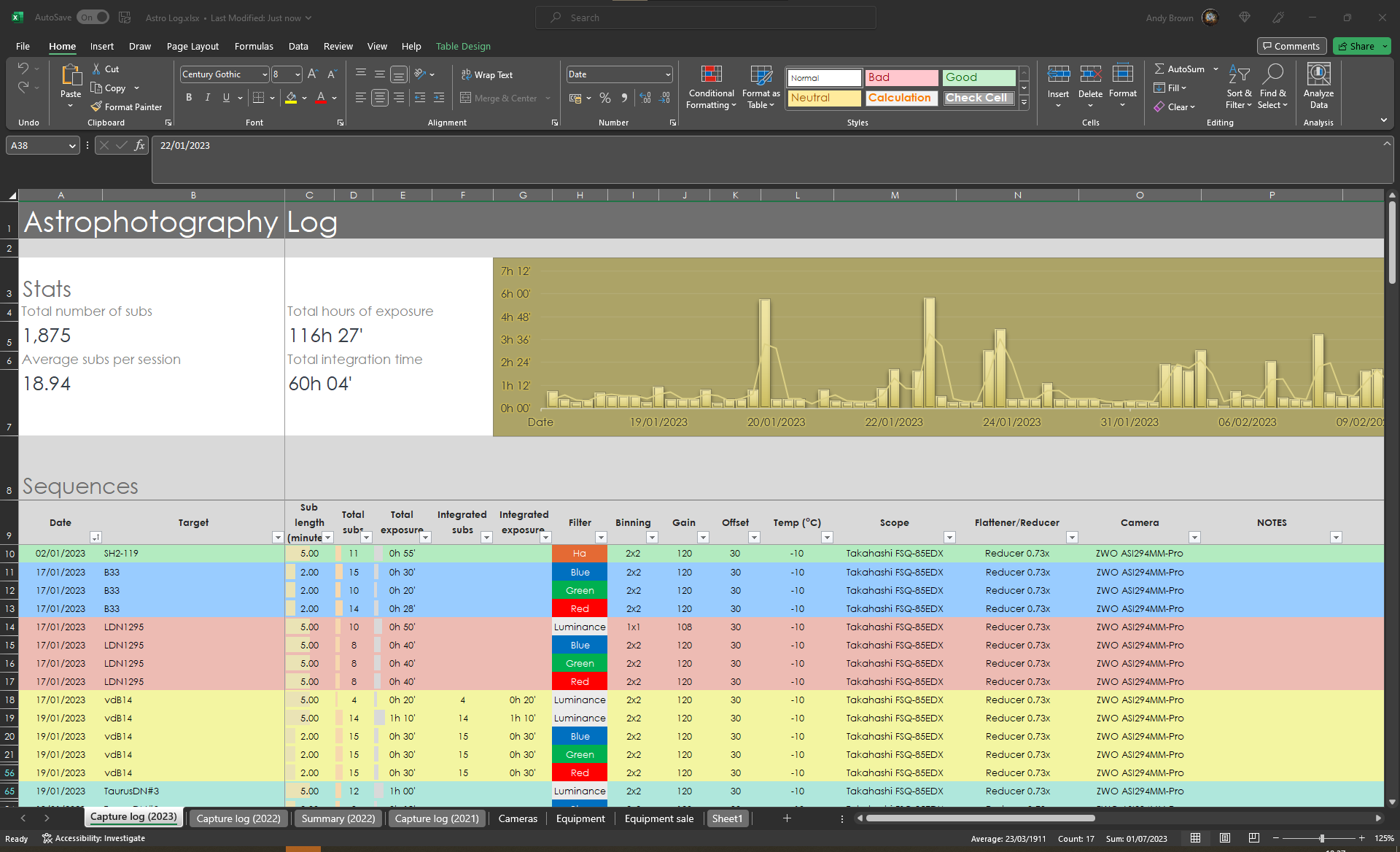
I keep a record of all my sessions in an Excel table (see below). I can filter by each column so, for example, select a specific target and filter to show how many subs and total exposure time. This is indispensible, especially if combining old and new data. I record Darks, Flats and Dark Flats in here too so I can see which sets of calibration frames correspond to which sessions.
Well Written Helpful Concise Supportive
Daniel,
This is a great post! After seeing the @Andy Brown spreadsheet I realize that I should start keeping a log. I have a lot of equipment. Lots of clouds and too many days in between imaging sessions.
I hate to ask, Andy would you share this spreadsheet to the Excel challenged members of the Astrobin community?
CS - Tim
This is a great post! After seeing the @Andy Brown spreadsheet I realize that I should start keeping a log. I have a lot of equipment. Lots of clouds and too many days in between imaging sessions.
I hate to ask, Andy would you share this spreadsheet to the Excel challenged members of the Astrobin community?
CS - Tim
Tim Ray:
Daniel,
This is a great post! After seeing the @Andy Brown spreadsheet I realize that I should start keeping a log. I have a lot of equipment. Lots of clouds and too many days in between imaging sessions.
I hate to ask, Andy would you share this spreadsheet to the Excel challenged members of the Astrobin community?
CS - Tim
Hi Tim/Daniel,
I'm more than happy to share this, no problem. I'll create an example template version and upload it to my OneDrive and post the link on here. I create a new sheet each year, just by copying the current year and clearing the data. I'm sure it could be improved with separate lists for the equipment as lookup tables, just haven't got round to doing that yet.
Clear skies,
Andy
Well Written Respectful Concise Supportive
Andy -
Thanks so much for your contribution! I look forward to the post!!!
CS - Tim
Thanks so much for your contribution! I look forward to the post!!!
CS - Tim

Looking forward to the Excel sheet, thanks !

As others have suggested, Excel (and/or Open Office) spreadsheets are extremely helpful as logs and characterization aids. I keep two main spreadsheets with several tabs in them. One I call "the planning worksheet" and the other "the archive".
The planning worksheet is a record of what targets I intended to image by date & time. I then color code what was actually observed. Moon obscuration is factored. I learned from scuba diving; plan your run and run your plan! After the run is over, I transfer those cells to a history tab for a running permanent record. The planning worksheet also contains tabs for setup and travel checklists. These setup/travel checklists are indispensable for avoiding mistakes. I always maintain and follow my checklists (or I'll definitely screw up)!

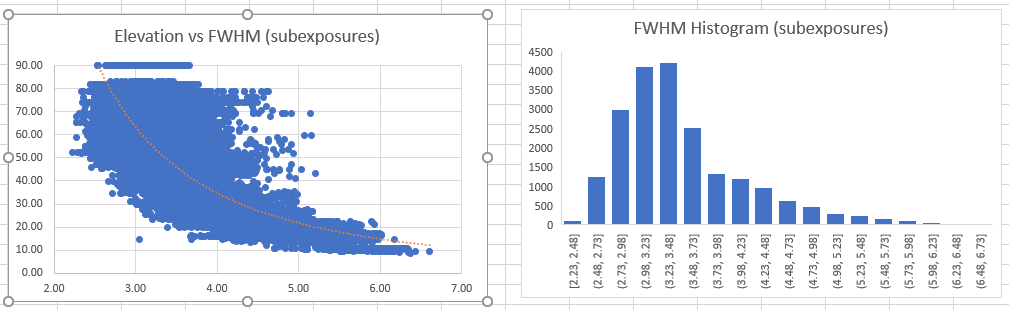
The main feature of the archive spreadsheet is one row for every kept subexposure of each target. Each row contains quality metrics (in my case from CCD_Inspector, but PixInsight SFS CSV output could do equally well). This is invaluable when wanting to sort or combine old data with new data. Roll-up/Summary data is kept for each target (avg FWHM, airmass, elevation, total exposure time, etc). I keep the main tab sorted by object (for object location ease), and another tab sorted by integration time (to know which objects are good and which need more time). Yet another tab defines metrics charts from roll-up data.

I think there's no end to the value that keeping a log/archive gives. Yes, it takes time to organize, but in the end it's a habit that pays huge dividends. You'll have a permanent record of all you've done, make fewer mistakes, and be able to characterize your data and progress over time. Now, even after 40K kept subs and all the work to keep it up, I can't imagine not having the logs & metrics. It's part of the habits in the hobby I enjoy (among all the other stuff). Gear and data.. oh my! CS Doug
The planning worksheet is a record of what targets I intended to image by date & time. I then color code what was actually observed. Moon obscuration is factored. I learned from scuba diving; plan your run and run your plan! After the run is over, I transfer those cells to a history tab for a running permanent record. The planning worksheet also contains tabs for setup and travel checklists. These setup/travel checklists are indispensable for avoiding mistakes. I always maintain and follow my checklists (or I'll definitely screw up)!
The main feature of the archive spreadsheet is one row for every kept subexposure of each target. Each row contains quality metrics (in my case from CCD_Inspector, but PixInsight SFS CSV output could do equally well). This is invaluable when wanting to sort or combine old data with new data. Roll-up/Summary data is kept for each target (avg FWHM, airmass, elevation, total exposure time, etc). I keep the main tab sorted by object (for object location ease), and another tab sorted by integration time (to know which objects are good and which need more time). Yet another tab defines metrics charts from roll-up data.
I think there's no end to the value that keeping a log/archive gives. Yes, it takes time to organize, but in the end it's a habit that pays huge dividends. You'll have a permanent record of all you've done, make fewer mistakes, and be able to characterize your data and progress over time. Now, even after 40K kept subs and all the work to keep it up, I can't imagine not having the logs & metrics. It's part of the habits in the hobby I enjoy (among all the other stuff). Gear and data.. oh my! CS Doug
Well Written Helpful Insightful Engaging Supportive

Daniel,
Very interesting post. I'm a data junkie and have kept logs for each imaging session since the late 80's (back in the film days). My logs (paper/pencil notebooks) are not as well organized as they could be, but I also record weather conditions. My most interesting take-away from this exercise is a graph of the temperature, cloud cover, seeing, and wind conditions over the years. The changing patterns are fascinating and not immediately apparent when we rely on memory. Another benefit of any long-term log as I and others have posted here is the ability to capture seasonal productivity. This helps calibrate my expectations as I plan future outings. I agree that image details are useful, but with changes to equipment, camera sensor sizes and sensitivity, these historic data become less useful.
cs
Mike
Very interesting post. I'm a data junkie and have kept logs for each imaging session since the late 80's (back in the film days). My logs (paper/pencil notebooks) are not as well organized as they could be, but I also record weather conditions. My most interesting take-away from this exercise is a graph of the temperature, cloud cover, seeing, and wind conditions over the years. The changing patterns are fascinating and not immediately apparent when we rely on memory. Another benefit of any long-term log as I and others have posted here is the ability to capture seasonal productivity. This helps calibrate my expectations as I plan future outings. I agree that image details are useful, but with changes to equipment, camera sensor sizes and sensitivity, these historic data become less useful.
cs
Mike
Well Written Helpful Insightful Respectful Engaging
Exactly what I need! I'm new, and I started running around with my telescope grabbing objects like a dog chasing cars… And now I see myself wondering what did I capture last year again…. The excel examples are excellent to bring more structure in it!
Doug Summers:
think there's no end to the value that keeping a log/archive gives. Yes, it takes time to organize, but in the end it's a habit that pays huge dividends. You'll have a permanent record of all you've done, make fewer mistakes, and be able to characterize your data and progress over time. Now, even after 40K kept subs and all the work to keep it up, I can't imagine not having the logs & metrics. It's part of the habits in the hobby I enjoy (among all the other stuff). Gear and data.. oh my
Thanks for info, looks like I need to start putting an excel spreadsheet together as I finally get into imaging

A long time ago I was working with MS Access and decided it would be good for an image database. I record all of the basic details along with the final image and some notes taken on the night. I added in all my film images as well so it goes back to 1980. The data is easily exported to Excel should Microsoft make the full office package too expensive for my taste. I like it as I can show the final image with the data but I think you can do that in Excel 🤔 I also keep all the NINA logs separately if I need to refer to them.
![[deleted]](/assets/images/default-avatar.jpeg?v=2)
I have a handwritten logbook. Mostly write a short summaries each time I've discovered something about the hobby that can help me in the future. Or something about my experiences testing stuff. It's simple but nice to have and fun to look back at in a few years.

@Andy Brown looking forward to your template. It looks very well! Thank you for that!!

great post, just started a mini version of a log in Apple Notes, just to keep track where I have been and where I want to go. Very handy.
I only keep track of catalog number, object name, gear used, # of exposures, total integration time, magnitude, size, orientation angle (key to revisits!) - very handy, but must be kept in a table, otherwise you go mad.
Nothing near to Dougs Excel monument - but slim and I have only 1 year of history so far …
Arny
I only keep track of catalog number, object name, gear used, # of exposures, total integration time, magnitude, size, orientation angle (key to revisits!) - very handy, but must be kept in a table, otherwise you go mad.
Nothing near to Dougs Excel monument - but slim and I have only 1 year of history so far …
Arny

I log everything too in excel but using the observing list function in Sky Safari as the "to do" list for my various scopes and lenses. It grays them out if they are not visible but makes it easy to center and check off when done. Nice job on the sheet above!
Jason
Jason
Supportive

I use SkyTools 4 for planning and logging. It has an excellent project management feature for imaging projects.
Well Written
A quick update on my spreadsheet, just tidying up the template with better data validation, should be ready soon. CS, Andy

Great post! I log all images in AstroPlanner from Paul Rodman. At first it is a bit intimidating, and it is originally written with visual in mind. But it is completely configurable and you can define custom fields throughout the application. As the name suggests, at the core is a planning tool, with access to any catalogue of objects thinkable. Next level of organisation is the sessions where you can store info on location, conditions etc. Within each session you can record observations. There is a resource manager where you can build a library of equipment (scopes, cameras, filters, etc). The way I work is that I make an observation for each combination of target/rig/filter and just enter the number of frames with that combo. As output I export an excel file that I can use in a data visualisation application. This way the tables and graphs for my website are automatically created.
There are a ton more capabilities, and I'm probably using less than a few percentage of all the options. But for planning and documenting I've found it very practical. There is also a very active community on which also the developer is active and responds very quickly on questions/bugs, etc. It's not free, I believe around $50 or so, but worth every penny.
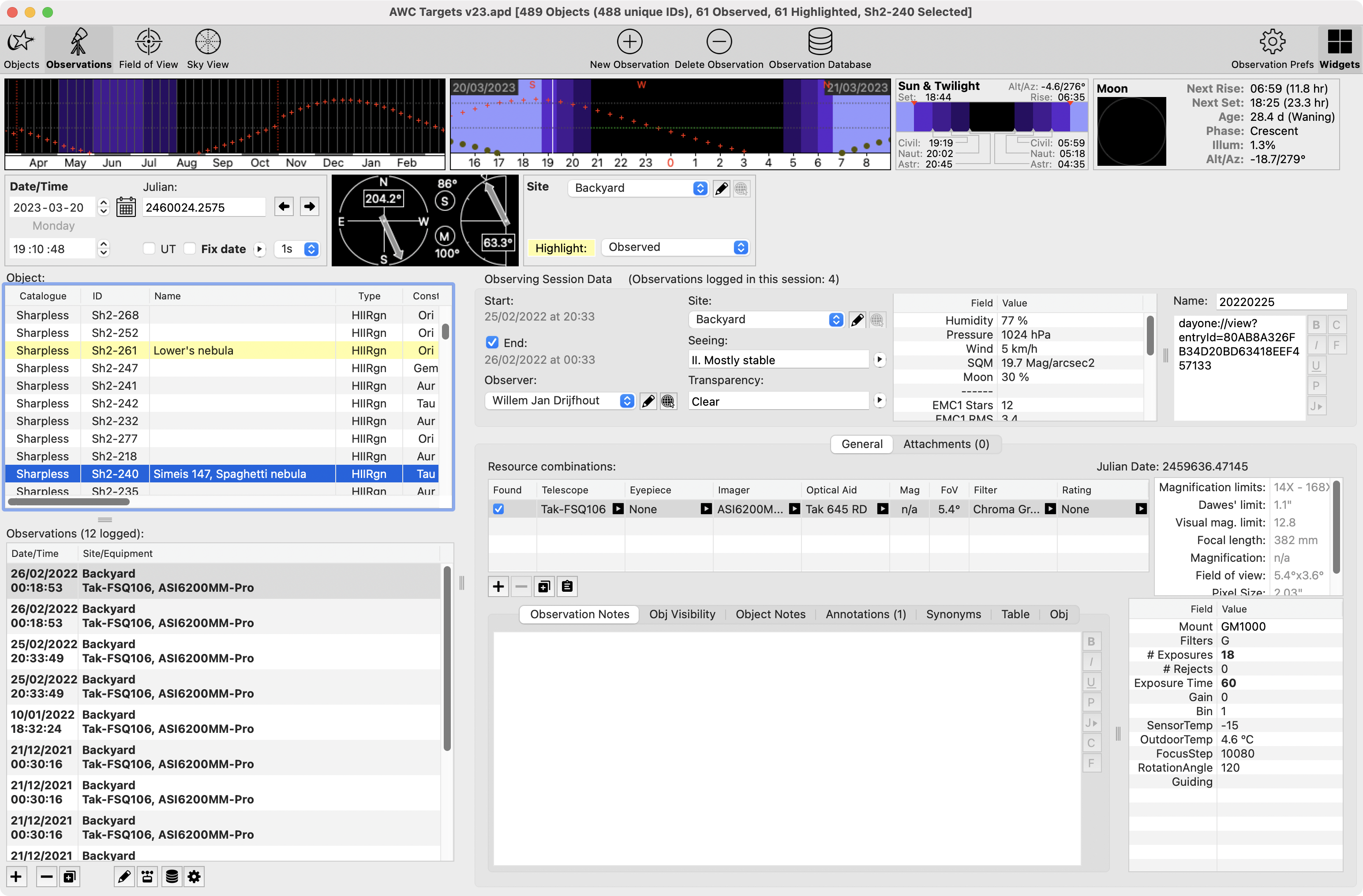
There are a ton more capabilities, and I'm probably using less than a few percentage of all the options. But for planning and documenting I've found it very practical. There is also a very active community on which also the developer is active and responds very quickly on questions/bugs, etc. It's not free, I believe around $50 or so, but worth every penny.
Helpful Respectful Engaging Supportive

Very cool ideas, you all! I'm with Cornelius: an old handwritten archive of experiences, mostly when I first started visual back in 1980. For some reason, i never carried it through to my photography, probably because I only image about ten times a year and I use pretty much all the same settings. All of my Nina data is on external drive and my folders tell enough of the story. But I am impressed by all of your different ways of dessagging your data!

Astrobin itself tends to be my logbook on specs. And I also run a daily journal that is less rigorous and more observational (like a ship's log). Lastly, I update a wishlist of desired targets constantly. All using a laptop. I use an app called Daily Journal, but any word-processing doc would work, too.
Well Written Concise
Hi guys,
I've just published a template for my Astro Log Excel spreadsheet here.
I've added a simple equipment database in the Equipment sheet which can be modified for your own setup. These tables are used as lists on the main sheet to select available equipment from a drop-down list or just type in the name which will be matched against the appropriate list.
The main sheet is setup as a table which automatically expands when you enter a new date (you should see the row change colour to green) and then all the fields can be populated. Note that the Total Exposure and Integrated Exposure fields are calculated automatically so make sure you don't overwrite the formula (I tried protecting these cells but it stops the table from auto-expanding).
Please feel free to download it and start using it. The first thing to do is populate the lists in the Equipment sheet (be careful not to insert rows, just overwrite what's there). Once you've entered some data each column in the table can be filtered using the little arrow next to the column name eg. Filter on a specific target and filter.
I hope this all makes sense, any questions or problems please let me know.
Clear skies,
Andy
I've just published a template for my Astro Log Excel spreadsheet here.
I've added a simple equipment database in the Equipment sheet which can be modified for your own setup. These tables are used as lists on the main sheet to select available equipment from a drop-down list or just type in the name which will be matched against the appropriate list.
The main sheet is setup as a table which automatically expands when you enter a new date (you should see the row change colour to green) and then all the fields can be populated. Note that the Total Exposure and Integrated Exposure fields are calculated automatically so make sure you don't overwrite the formula (I tried protecting these cells but it stops the table from auto-expanding).
Please feel free to download it and start using it. The first thing to do is populate the lists in the Equipment sheet (be careful not to insert rows, just overwrite what's there). Once you've entered some data each column in the table can be filtered using the little arrow next to the column name eg. Filter on a specific target and filter.
I hope this all makes sense, any questions or problems please let me know.
Clear skies,
Andy
Helpful Engaging Supportive
Andy Brown:
Hi guys,
I've just published a template for my Astro Log Excel spreadsheet here.
I've added a simple equipment database in the Equipment sheet which can be modified for your own setup. These tables are used as lists on the main sheet to select available equipment from a drop-down list or just type in the name which will be matched against the appropriate list.
The main sheet is setup as a table which automatically expands when you enter a new date (you should see the row change colour to green) and then all the fields can be populated. Note that the Total Exposure and Integrated Exposure fields are calculated automatically so make sure you don't overwrite the formula (I tried protecting these cells but it stops the table from auto-expanding).
Please feel free to download it and start using it. The first thing to do is populate the lists in the Equipment sheet (be careful not to insert rows, just overwrite what's there). Once you've entered some data each column in the table can be filtered using the little arrow next to the column name eg. Filter on a specific target and filter.
I hope this all makes sense, any questions or problems please let me know.
Clear skies,
Andy
Thank you so much for taking the time to share this with us!
Well Written Respectful Supportive
Thank you @Andy Brown !!

@Andy Brown it would be great if you did a brief "how to" youtube video on how to get started using this Excel sheet....how to put in the values, etc and how to make best use of it...