How to get "good" stars in OSC data using dual narrowband filter?

9 replies318 views
Photon_Collector avatar
Hi all, 

Not sure if this belongs in the acquisition forum or here. See this recent image I took:
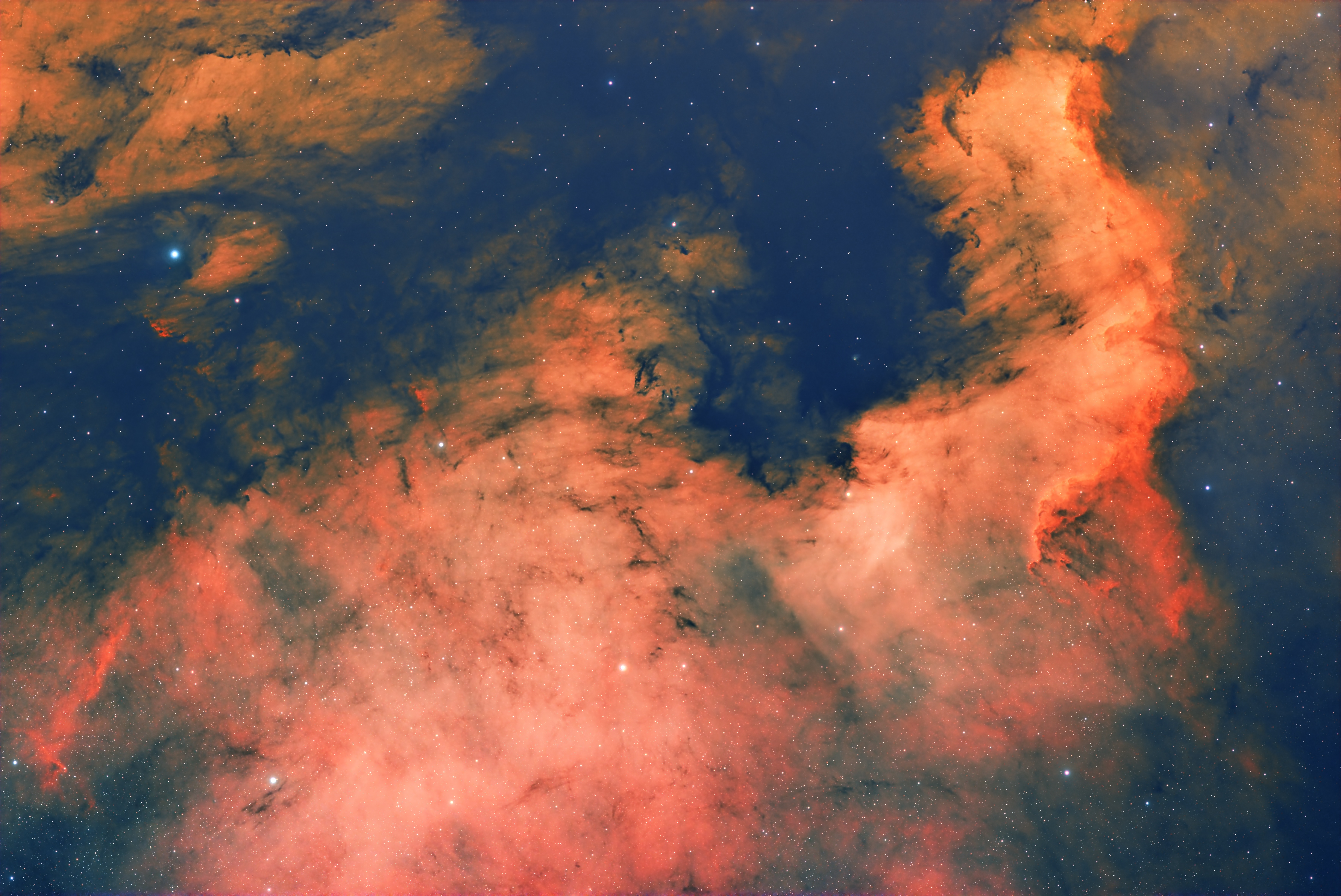


This was using the 2600MC Pro camera and the optolong L-eNhance filter. These are 5 minute subs (~14 hours). Is the best way to get more natural stars to take the filter out and then image again to get the full colors? Or is there an "easy fix" in processing that can make the dual narrowband stars look better?
Engaging
Christian Großmann avatar
Hi,

in NB imaging, the stars won't get as good as without the filters. There are some workaround like using SPCC in PixInsight with it's narrowband mode to try to get the colors of the stars back, but it will not be as good as taking real RGB stars. But if you just need the stars, you won't need much exposure time. They are quite bright and noise is usually no issue if you cut them out anyway and leave the rest of the image unused. The quality will be much much better this way.

I used to keep the NB stars in my images. but during the latest sessions I took the time to get 45mins of RGB data just to use the stars for my 25+ hours NB data. This was a great improvement and I will keep doing this in the future.

Hope this helps

CS
Christian
Helpful Insightful Respectful Engaging
Tim Ray avatar
Setiastro has a script to take NB stars from your filter and make rgb stars. It combines, stretches, svnr and saturation.  Of course, this is for PI.. I can't wait to see your result
Photon_Collector avatar
Christian Großmann:
Hi,

in NB imaging, the stars won't get as good as without the filters. There are some workaround like using SPCC in PixInsight with it's narrowband mode to try to get the colors of the stars back, but it will not be as good as taking real RGB stars. But if you just need the stars, you won't need much exposure time. They are quite bright and noise is usually no issue if you cut them out anyway and leave the rest of the image unused. The quality will be much much better this way.

I used to keep the NB stars in my images. but during the latest sessions I took the time to get 45mins of RGB data just to use the stars for my 25+ hours NB data. This was a great improvement and I will keep doing this in the future.

Hope this helps

CS
Christian


So you make 2 masters, a NB master and the "stars master" then Extract stars from that and combine with the NB data, is that correct? I need to get a filter drawer/wheel.
Photon_Collector avatar
Tim Ray:
Setiastro has a script to take NB stars from your filter and make rgb stars. It combines, stretches, svnr and saturation.  Of course, this is for PI.. I can't wait to see your result


Oh awesome, do you have a link to the website or directory I can add to PixInsight?
patrice_so avatar
I systematically capture 60-120 minutes of shorter exposures to capture RGB stars separately. You can do it even with the moon out. I then exact a star layer that I add to the narrowband image.
Tim Ray avatar
Sorry for the delay in the response. Was caught up at work longer than expected.  The setiastro scripts can be found at https://www.setiastro.com/pjsr-scripts


Has some great star stretching scripts...

CS Tim
Photon_Collector avatar
Tim Ray:
Sorry for the delay in the response. Was caught up at work longer than expected.  The setiastro scripts can be found at https://www.setiastro.com/pjsr-scripts


Has some great star stretching scripts...

CS Tim


no worries, thanks!
Christian Großmann avatar
So you make 2 masters, a NB master and the "stars master" then Extract stars from that and combine with the NB data, is that correct? I need to get a filter drawer/wheel.

That's basically it. The answers above already suggested the Script from SetiAstro. But personally I use the StarRedurction script and PixelMath to combine both images.
Guillermo (Guy) Yanez avatar
You have a few options within Siril. If you want to get a more natural color for the entire image, just get your original stacked fit file and run Photometric color calibration.
In case you are satisfied with the color of the nebula and just want to render a natural color for your stars, you will want to duplicate your original fit file. Run the Photometric color calibration on one copy file and then run Starnet star removal tool. Save the star mask.
Take your first image and run the  Starnet star removal tool and now process the starless image as you wish. Once you are happy with the result, run Star recomposition using your processed starless image and the previous star mask with the photometric calibration applied to it. 
That should do the work for you
Helpful
Related discussions
36mm filters in 2" filter wheel?
Hi all, I was set on moving from DSLR to mono this year but I think I will go with and ASP-C OSC(2600MC pro) in the end. There hasn’t been a fully clear night since the end of September and I’m not sure if I would be able to make the best use of Mono...
Uses same 2600MC Pro camera; discusses filter wheel setup considerations.
Nov 9, 2025
Astro pixel Processor - How to combine a OSC broadband image and Extracted Ha and OIII from a dualband filter?
Hello All, I have a 2600MC-pro and have been using APP for a couple of years. I normally am only using 1 filter so no issues stacking. APP has been great. Now I would now like to take broadband subs and add the Extracted Ha and OIII from my antlia AL...
Directly addresses combining OSC broadband with narrowband filtered images in processing.
Sep 5, 2025