Hello,
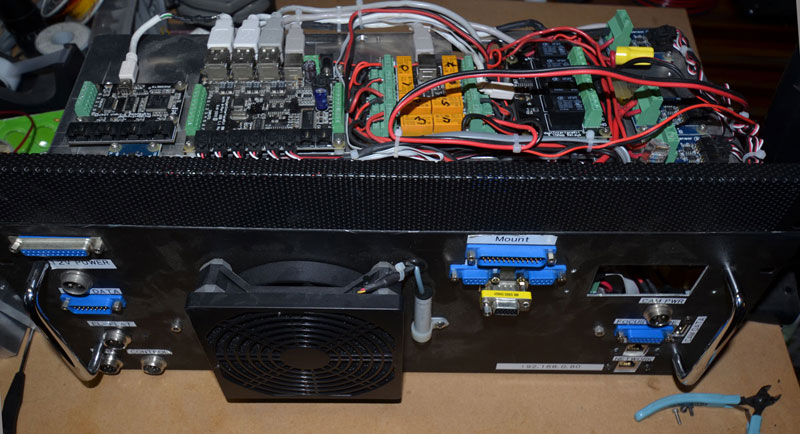
I would like to share here another article, this time a suitcase that I designed last year:
https://aiastro.wordpress.com/2020/01/04/astrohub-v2/

The title claims about cable management, but let's be honest. It all about sleep! I suppose that most of us have had the same difficulties once we try to fully automate our equipment. Software is one of them, although now there are marvelous programs like SGP, NINA, Voyager that covered this necessity, but hadrware is the other great difficulty, and this project tries to solve it, or at least helps.
This is a different aproach to the all-on-top philosophy, very popular this days, but I prefered this aproach by the following:
-It is not attached to the optical train, so it can be used with different optical configurations.
-For the same reason, it doesn't add weight to the mount. This is specially important for users, with lightweight mounts, like my HEQ5, or a Star Adventurer, for example.
-The cable from the USB Hub to the computer is shorter. This is simportant for users, like me, using laptops on a separate table. I have read many happy users claiming how easy is to manage only one power cable and one USB cable from the imaging rig. I respect that, but in prefered to not to extend the most busy USB cable.
As other of my articles, it is quite long, so I suggest to read the original article and here I share some key points.
As a backgroung, when I started in astrophotography 15 years ago I started to buy all the necessary to make my imaging rig to work, and you know what does it means... tons of cables everywhere, many time spent each session to assemble and disassemble, less than optimal connections, and all this leads to failures caused by inconsistencies and lack of repeatability...and this forces the user to be in front of the equipment all night, checking the process continously, waiting with fear to the meridian flip, and so on.
This was my own cable disaster in 2008 (I feel not comfortable calling it cable management)

Then in 2010 I attached all this components on a plate and hanged it from my pier/tripod. It was an improvement, but certainly it didn't allowed me to go to sleep.
I was out of atrophotography from 2010 to 2017 (family grew up) and when I returned, I remembered how much time this hobby consumes! It was obvious that I had to improve my setup time, and started to design this thing. I made a first version (well it was really the 4th or 5th...) and last year I could complete this new 2.0 version.
I would like to share here another article, this time a suitcase that I designed last year:
https://aiastro.wordpress.com/2020/01/04/astrohub-v2/
The title claims about cable management, but let's be honest. It all about sleep! I suppose that most of us have had the same difficulties once we try to fully automate our equipment. Software is one of them, although now there are marvelous programs like SGP, NINA, Voyager that covered this necessity, but hadrware is the other great difficulty, and this project tries to solve it, or at least helps.
This is a different aproach to the all-on-top philosophy, very popular this days, but I prefered this aproach by the following:
-It is not attached to the optical train, so it can be used with different optical configurations.
-For the same reason, it doesn't add weight to the mount. This is specially important for users, with lightweight mounts, like my HEQ5, or a Star Adventurer, for example.
-The cable from the USB Hub to the computer is shorter. This is simportant for users, like me, using laptops on a separate table. I have read many happy users claiming how easy is to manage only one power cable and one USB cable from the imaging rig. I respect that, but in prefered to not to extend the most busy USB cable.
As other of my articles, it is quite long, so I suggest to read the original article and here I share some key points.
As a backgroung, when I started in astrophotography 15 years ago I started to buy all the necessary to make my imaging rig to work, and you know what does it means... tons of cables everywhere, many time spent each session to assemble and disassemble, less than optimal connections, and all this leads to failures caused by inconsistencies and lack of repeatability...and this forces the user to be in front of the equipment all night, checking the process continously, waiting with fear to the meridian flip, and so on.
This was my own cable disaster in 2008 (I feel not comfortable calling it cable management)
Then in 2010 I attached all this components on a plate and hanged it from my pier/tripod. It was an improvement, but certainly it didn't allowed me to go to sleep.
I was out of atrophotography from 2010 to 2017 (family grew up) and when I returned, I remembered how much time this hobby consumes! It was obvious that I had to improve my setup time, and started to design this thing. I made a first version (well it was really the 4th or 5th...) and last year I could complete this new 2.0 version.
 The Power Hub has 3 DC independent circuits:


 The Equipment Master Cable includes all the interfaces to connect to the equipment. This master cable has been marked to know were to be clamped to the mount quickly and safely. Data cables are shielded to protect data from electronic interferences. It is 3m long.


 ).
).


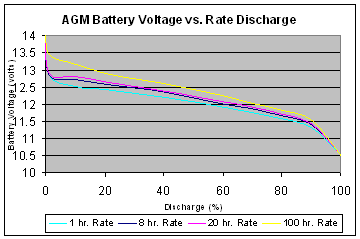
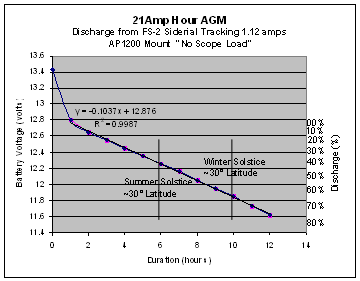 AP1200 FS-2 power requirements at 12 volts: