SPCC with weird results (linear image)

18 replies1k views
André Moleiro avatar
Hi everyone! I'm trying the SpectroscopicColorCalibration for the first time, and I haven't stretched my image yet.

So far all I have done is WBPP, Crop, Alignment, Channel Combination and Image Solver. But even on my OSC images I still get these funny-looking results after running SPCC:


This happens whether I have the Channels Linked on STF or not. I also tried to run this with a narrowband image (applying the narrowband checkbox and editting the filters), and the result was very similar.

Am I missing something? AFAIK, SPCC should be done with the image still linear, on an early stage in order to execute background neutralization and SCNR, right?

Thank you!
Well written Respectful
Taras_M avatar
André Moleiro:
Hi everyone! I'm trying the SpectroscopicColorCalibration for the first time, and I haven't stretched my image yet.

So far all I have done is WBPP, Crop, Alignment, Channel Combination and Image Solver. But even on my OSC images I still get these funny-looking results after running SPCC:


This happens whether I have the Channels Linked on STF or not. I also tried to run this with a narrowband image (applying the narrowband checkbox and editting the filters), and the result was very similar.

Am I missing something? AFAIK, SPCC should be done with the image still linear, on an early stage in order to execute background neutralization and SCNR, right?

Thank you!

Just redo STF with channels linked
André Moleiro avatar
André Moleiro:
Hi everyone! I'm trying the SpectroscopicColorCalibration for the first time, and I haven't stretched my image yet.

So far all I have done is WBPP, Crop, Alignment, Channel Combination and Image Solver. But even on my OSC images I still get these funny-looking results after running SPCC:


This happens whether I have the Channels Linked on STF or not. I also tried to run this with a narrowband image (applying the narrowband checkbox and editting the filters), and the result was very similar.

Am I missing something? AFAIK, SPCC should be done with the image still linear, on an early stage in order to execute background neutralization and SCNR, right?

Thank you!

Just redo STF with channels linked

@Taras_M hey friend, so I mentioned in my post that I have already tried it. The result is the same
andrea tasselli avatar
Do a ColorCalibration and see what happens. Be sure you have the latest PI as this was a bug happening sometimes with older versions.
GoldTop57 avatar
Try resetting the screen transfer function and then reapply SFTF Autostretch.
Well written
nico1038 avatar
This image can't possibly have been autostreched after SPCC (as all  this tool does is trying to set a reasonnable background, which is not the case here) unless your image is severly broken to begin with.
Does an unlink autostreched of your image before SPCC looks normal?
Frank Roettcher avatar
Maybe you should just use HT with preview and manually stretch in order to exclude, that your STF is causing the issue.
Michael Hensley avatar
My workflow consists of PI WBPP,  switching to GraXpert, performing crop, and removing gradients. Back to PI: Imagesolver, then finally SPCC. I do not think you would use a channel combination, as SPCC would adjust that for you from Gaia DB. I could be wrong, though.
m159267 avatar
Does your image look OK just prior to SPCC?
Andrea Martignano avatar
André Moleiro:
@Taras_M hey friend, so I mentioned in my post that I have already tried it. The result is the same

I know it shouldn't work like this, but have you tried it without selecting a preview for background normalization? In case what is the result?
And how is the STF stretched image before SPCC?
m159267 avatar
…and if you haven't already, try selecting your 24 bit LUT option.
deleted avatar
So far all I have done is WBPP, Crop, Alignment, Channel Combination and Image Solver. But even on my OSC images I still get these funny-looking results after running SPCC


Hello,

Reading this I supposed you have monochrome camera with red, green and blue filters. But... The label on your screenshot says "...RGB_Integration" wich let's me think of OSC.
If it's OSC, SPCC parameters seems OK but why did you do some channel combination and all that kind of stuff? WBPP takes care of all that stuff, I don't see any reason to do that manually. (By the way, if it's OSC, you should run "drizzle x1 integration" if possible; it really helps with SPCC and clors in general).

Anyway, I think the problem has something to do with "Channel combination"; it looks like you combined images that have difference regarding of the PSF (size of stars are not the same for all channels).
Tim Hutchison avatar
The first thing that I noticed is that you have "Ideal QE Curve" selected. I always select my actual sensor.  And make sure you have the correct filters selected. Also, I never set a region of interest for background neutralization. Try experimenting with those things. I would be very interested in your results.

Best.
Tim
Helpful
Chiradeep Chhaya avatar
So far all I have done is WBPP, Crop, Alignment, Channel Combination and Image Solver. But even on my OSC images I still get these funny-looking results after running SPCC


Hello,

Reading this I supposed you have monochrome camera with red, green and blue filters. But... The label on your screenshot says "...RGB_Integration" wich let's me think of OSC.
If it's OSC, SPCC parameters seems OK but why did you do some channel combination and all that kind of stuff? WBPP takes care of all that stuff, I don't see any reason to do that manually. (By the way, if it's OSC, you should run "drizzle x1 integration" if possible; it really helps with SPCC and clors in general).

Anyway, I think the problem has something to do with "Channel combination"; it looks like you combined images that have difference regarding of the PSF (size of stars are not the same for all channels).

drizzle 1x from WBPP, or as a separate process with CFA drizzle enabled?
deleted avatar
Chiradeep Chhaya:
So far all I have done is WBPP, Crop, Alignment, Channel Combination and Image Solver. But even on my OSC images I still get these funny-looking results after running SPCC


Hello,

Reading this I supposed you have monochrome camera with red, green and blue filters. But... The label on your screenshot says "...RGB_Integration" wich let's me think of OSC.
If it's OSC, SPCC parameters seems OK but why did you do some channel combination and all that kind of stuff? WBPP takes care of all that stuff, I don't see any reason to do that manually. (By the way, if it's OSC, you should run "drizzle x1 integration" if possible; it really helps with SPCC and clors in general).

Anyway, I think the problem has something to do with "Channel combination"; it looks like you combined images that have difference regarding of the PSF (size of stars are not the same for all channels).

drizzle 1x from WBPP, or as a separate process with CFA drizzle enabled?

This will gives you the exact same result
The only  difference you'll get is when you have "autocrop" option check. WBPP will also autocrop and solve the drizzled image; if you do it with the separate process, you'll have to crop and solve the image by yourself.
By the way, don't forget to also add normalisation data (.xmnl files) in your process; they are generetad by WBPP if you have enabled "Normalization" option.
Concise
maxchess avatar
Make sure that the “chrominance noise reduction” box is UNTICKED in LRGB combination. I got the same artefacts by leaving it ticked when combining linier images. When I unticked it everything was fine.
Helpful Concise
André Moleiro avatar
Hi everyone, thanks so much for the replies and suggestions!

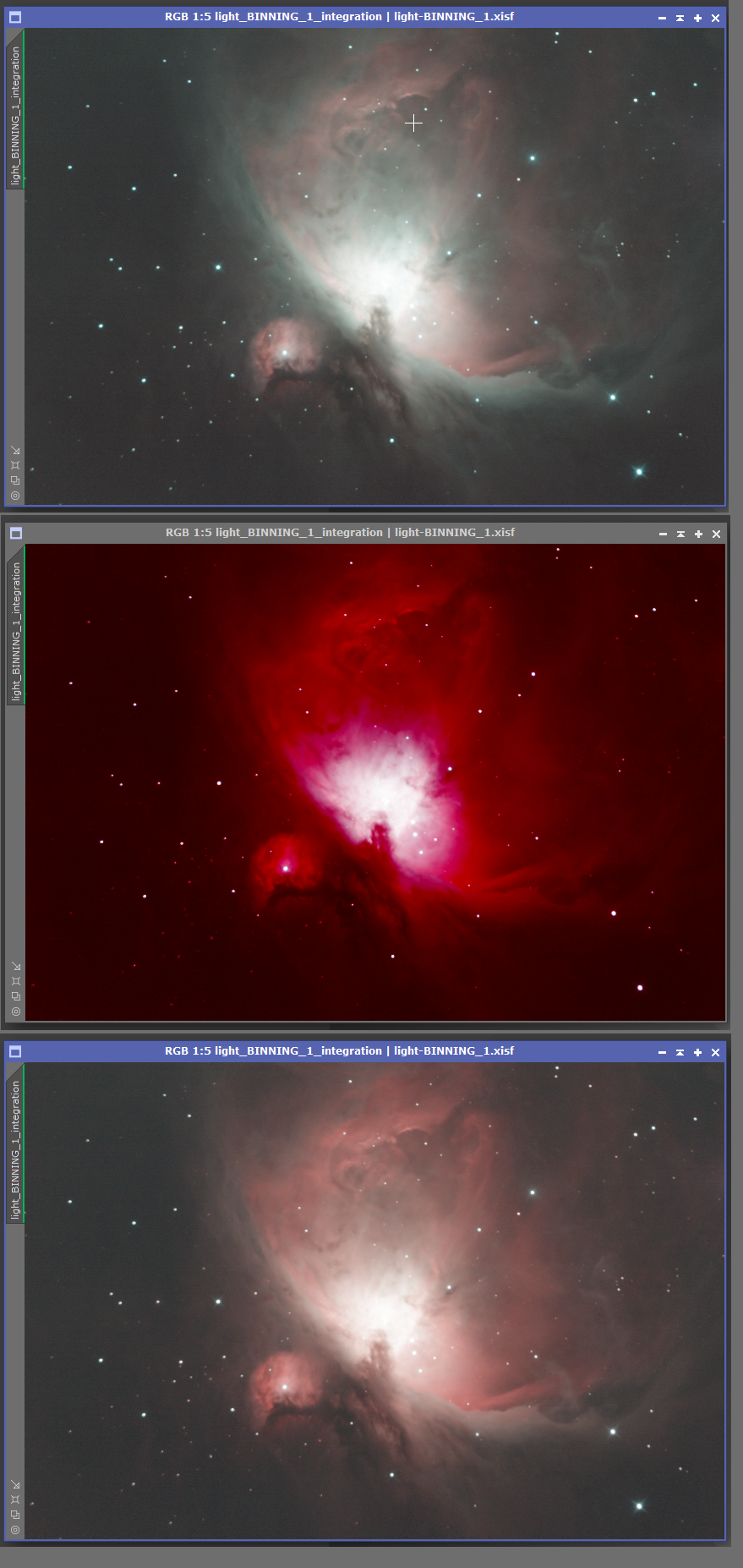
I'm not sure exactly what happens, but I found a way to overcome the issue: I need to apply SPCC with the Channels Linked on STF (even though applying an auto-stretch with it enabled messes it up).. It will generate an image with the same aberration, but then I can just auto-stretch again, and the image will come back to normal, with the SPCC process applied.

Example below (OSC image).


1) Original image with an auto-stretch (STF Channels unlinked)
2) SPCC applied with STF Channels linked
3) Applied another auto-stretch with STF Channels linked

In the tutorials I watched, people wouldn't apply another auto-stretch after running SPCC, so I still don't know what that's about. In any case, it seems to be working with theworflow I described.

Thank you, everyone!
Moleiro
Helpful Respectful
nico1038 avatar
Hello Moleiro

The way the channels are linked on STF have nothing to do with the results of SPCC. Don't forget STF is a visualisation tool only. It doesn't change anything to your image (which is still linear at that stage).

The results you are seeing after SPCC are normal. As it has been said in the very first messages of this thread you only need to reapply an STF (with linked channels) to see a normal image again.

Nico
Helpful Concise
mackiedlm avatar
You are now doing what Taras_m suggested in the second post. It does not matter what STF is applied before running SPCC as the actual image data being calibrated is not affected by the STF. After SPCC the stf parameters remain as they were set before running SPCC and the image will look like this until you run stf again. At which point it will set the parameters based on the post SPCC image/data.

This is completly normal. As Taras _m said  Just redo STF with channels linked after spcc.