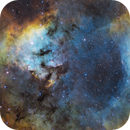
Comments on this image of NGC 7822 appreciated.

15 replies759 views
David Kennedy avatar
I am looking for constructive feedback on my latest image. The subs were from last year, but I did not get around to processing them until this week. 
Well written
Connor Kessler avatar
I won't lie, I really don't have any criticism at all here considering this picture is 10000x nicer than anything I've ever taken.  I'm just stopping by to gawk and to say I absolutely love it smile
Well written Respectful Engaging Supportive
David Kennedy avatar
Connor Kessler:
I won't lie, I really don't have any criticism at all here considering this picture is 10000x nicer than anything I've ever taken.  I'm just stopping by to gawk and to say I absolutely love it 

Thank you for the positive comments. I am glad you liked the image.
Well written Respectful
gmadkat avatar
I think it is a beautiful image, great color and composition! One suggestion is to separate stars and perhaps reduce stars and also the color haloes of the larger stars.
Supportive
David Kennedy avatar
gmadkat:
I think it is a beautiful image, great color and composition! One suggestion is to separate stars and perhaps reduce stars and also the color haloes of the larger stars.

I did do a subtle halo reduction in PI, and I certainly could have spent more time doing so. Thanks for the feedback.
Well written Respectful
Fritz avatar
Hi David
a nice picture. For my feeling, star size is just about right, but I would definitely try to remove blue halos on brighter stars. In addition, I feel that your denoising is a bit too aggressive, eliminating all high frequency noise but leaving a blotchy background, best seen at the corners and at the top of your pic. There should be some high frequency noise in the image to make it look more natural and you should remove - if possible - any low frequency (blotchy) noise.

In PI i use TGVDenoise for controlling high frequency noise and MMT for eliminating low frequency noise.

Cheers,

Fritz
Helpful Insightful Respectful
David Kennedy avatar
Thank you 
Fritz:
Hi David
a nice picture. For my feeling, star size is just about right, but I would definitely try to remove blue halos on brighter stars. In addition, I feel that your denoising is a bit too aggressive, eliminating all high frequency noise but leaving a blotchy background, best seen at the corners and at the top of your pic. There should be some high frequency noise in the image to make it look more natural and you should remove - if possible - any low frequency (blotchy) noise.

In PI i use TGVDenoise for controlling high frequency noise and MMT for eliminating low frequency noise.

Cheers,

Fritz

Thank you Fritz, I did push the denoting a bit intentionally from the start as I did not think I had enough data in either the SII or the OIII channels to get the noise where I wanted it. Ha with the stronger signal looked pretty good. I did create a mask and did more work on the darker areas which is probably what you were seeing. Perhaps a softer touch would be better. 

I have not spent much time trying TGVDenoise. I will give it a go.

I will try reducing the halos, they technique I used on Gama Cyg worked quite well. I am reluctant to go in and paint or clone those areas.

Thanks again for your thoughtful and insightful  comments. Have an awesome day and night. 

Dave
Respectful Supportive
gmadkat avatar
Great tip on denoising with MLT vs TGV Fritz, thank you! I typically do MLT denoising on 4 to 5 layers at 50% linear and then TGV linear.
Well written Concise
David Kennedy avatar
gmadkat:
Great tip on denoising with MLT vs TGV Fritz, thank you! I typically do MLT denoising on 4 to 5 layers at 50% linear and then TGV linear.

I would appreciate any links to using this strategy with both of these tools. I have some time working with MLT. In this image I only used MureDenoise with a mask to protect the brighter areas.
gmadkat avatar
Hi David,

I also do protect bright areas with a mask.. and I have the following saved as an icon in Pixinsight to reuse, and I tweak the number of layers and the number of iterations by experimenting with a preview of the image until I am happy with the denoising in linear. This is just a rough guideline that I use and fine tune as needed. 


For TGVDenoise I start with the default settings for RGB and CIE and try on a preview too.

I hope this helps!! 

Gowri
Helpful
Bray Falls avatar
Very nice! Quite a good image. I actually like the star halos, I think giving some glow to the brighter stars can add a good dramatic look. All you have is a bit of color noise which I'd recommend adobe camera raw filter to kill.
Respectful Supportive
David Kennedy avatar
gmadkat:
Hi David,

I also do protect bright areas with a mask.. and I have the following saved as an icon in Pixinsight to reuse, and I tweak the number of layers and the number of iterations by experimenting with a preview of the image until I am happy with the denoising in linear. This is just a rough guideline that I use and fine tune as needed. 


For TGVDenoise I start with the default settings for RGB and CIE and try on a preview too.

I hope this helps!! 

Gowri

Perhaps a dumb question but do you do use these routines on individual channels before integration or after? I also assume you do this on a linear image as that is how I was taught to do MUREDenoise?
gmadkat avatar
Not at all a dumb question! I typically do it after ChannelCombination for RGB, but for Ha and Lum I do it on the individual channels. And yes, I do it on a linear image.
Well written Respectful Concise Supportive
Fritz avatar
David Kennedy:
gmadkat:
Great tip on denoising with MLT vs TGV Fritz, thank you! I typically do MLT denoising on 4 to 5 layers at 50% linear and then TGV linear.

I would appreciate any links to using this strategy with both of these tools. I have some time working with MLT. In this image I only used MureDenoise with a mask to protect the brighter areas.

David and others who might be interessted,Jon Rista has a great tutorial for that starting at https://jonrista.com/the-astrophotographers-guide/pixinsights/effective-noise-reduction-part-1/
It is some reading but worth your time.
 CS
Fritz
David Kennedy avatar
Fritz:
David Kennedy:
gmadkat:
Great tip on denoising with MLT vs TGV Fritz, thank you! I typically do MLT denoising on 4 to 5 layers at 50% linear and then TGV linear.

I would appreciate any links to using this strategy with both of these tools. I have some time working with MLT. In this image I only used MureDenoise with a mask to protect the brighter areas.

David and others who might be interessted,Jon Rista has a great tutorial for that starting at https://jonrista.com/the-astrophotographers-guide/pixinsights/effective-noise-reduction-part-1/
It is some reading but worth your time.
 CS
Fritz

I have spent the last couple hours going through TGVDenoise on Jon's site. So far all attempts in Linear mode result in bad ringing on the stars and over correction of the image. Based on other guides I tried again with a stretched image and it seems to work as expected.  I am working on each channel separately, I wonder if I should do deconvolution first, then combine the channels and apply noise reduction using TGV and MLT??

Thanks for all the help

edit to add: Ok, I found a solution to the ringing by decreasing the Edge Protection to the -5 scale. I am trying different masks now to optimize the masks for a subtle reduction.
David Kennedy avatar
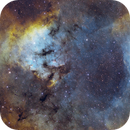
Thanks for all the feedback. I spent the last two days learning and working on TGV and MLT to get a better noise profile for may latest image. In going back through the PI history it appears that one of the processes was inadvertently applied and worsened the noise. It was definitely posterized in the darker areas. I believe that problem is gone in this new version. 

I also spent some time reducing the halos around the stars. 

I do have two new versions today. I believe the one currently marked final is a bit better. I probably need to redo my monitor calibration tonight for one more look before moving on. 

Any comments are very much appreciated and thanks again for those who chimed in or otherwise gave the image a like. 

Respectful Supportive
Related discussions
[RCC] Heart nebula. First time looking for feedback!
So I've always been more of a lurker of forums than interacting, but I've enjoyed where the astrophotography journey has taken me and would love to know more about how to do more with my images and such. Going to do an info dump below on the ...
Other astrophotographer seeking feedback on first processed image.
Oct 9, 2023
[RCC] M42 Orion Nebula
Hi, I'm looking for constructive criticism of my latest capture of the Orion Nebula I'm fairly new to astro photography and like most people in England, am really struggling to get any time outside nowadays as it's rarely clear here in No...
Another astrophotographer requesting constructive criticism on recent capture.
Mar 11, 2024