Help linking flats to correct lights in WBPP

8 replies136 views
Oscar H. avatar
I'm doing a multi night project, and I have been using a certain set of flats to correct my lights, 205 H-alpha lights, which I took over many weeks

those flats only work with those lights

but, unfortunately, because I wanted to keep it safe, I one day, recently tried to stuff my refractor inside a drawer (which didn't work)

and that slightly unscrewed some spacers and EFW, which then caused my flat field to change

so, after my next, most recent session of lights (another 49 H-alpha lights), I took new flats

my question is, how do I link the 205 lights with the old flats and the new 49 lights with the new flats, in WBPP? so that they're calibrated separately, but stacked together after calibration?

I tried adding the new lights as a separate group for separate calibration, but it adds them to the old automatically, I tried many buttons already

how do I do this? there must be an obvious way I'm missing.
Mike Webster avatar
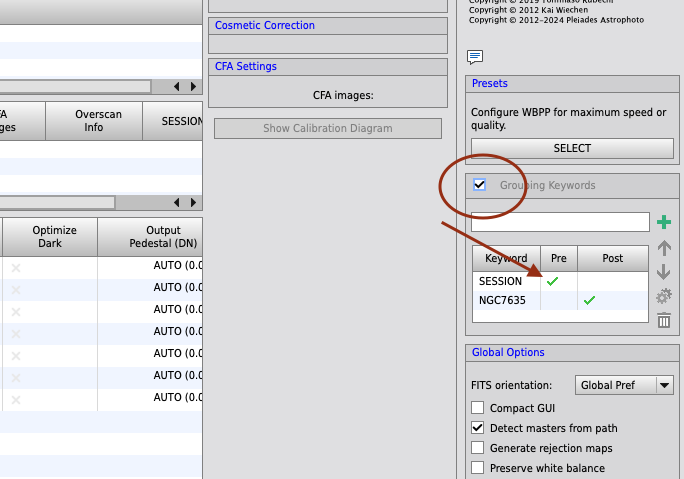
I'll typically handle this through the 'grouping keywords' option in WBPP or FBPP.

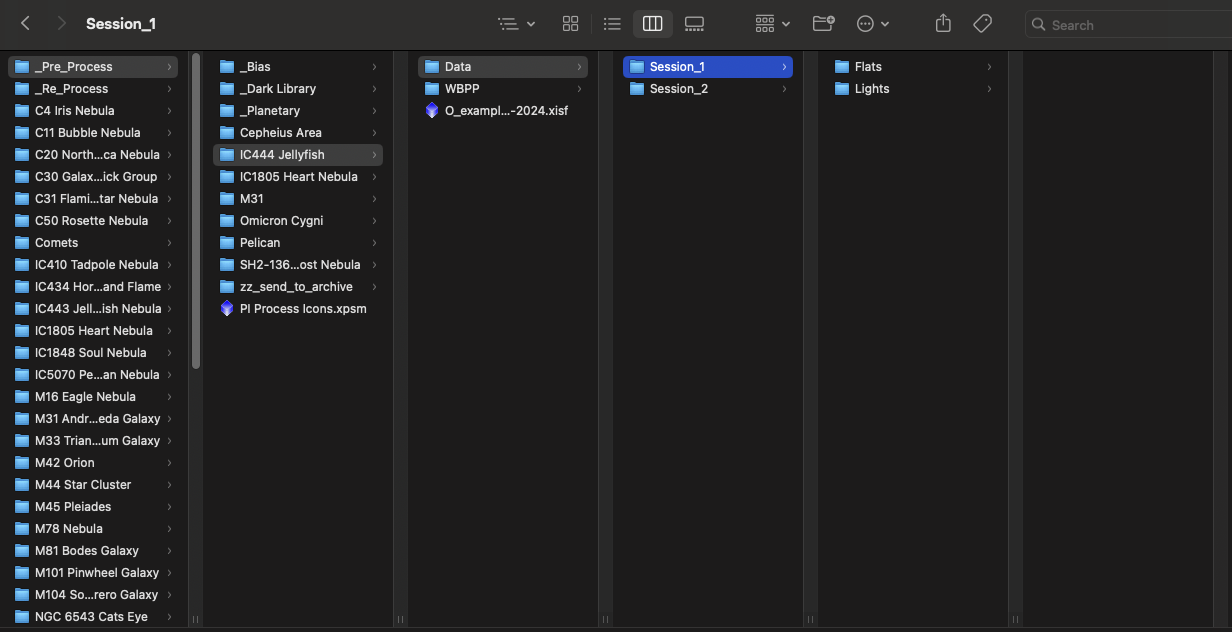
Put the lights and flats into different folders for each set that has their own flats to pair with. Then, name the folder <KEYWORD>_#. For example, I often use SESSION as my keyword and then use 1, 2, 3, etc. to represent the different lights & flats. WBPP will use the folder naming just before and after the underscore to determine if a keyword is in use. 

So the full file path might be something like: Hard Drive > User Name > Pictures > Astro Stuff > M31 > Session_1

WBPP will recognize the SESSION keyword and group each set of lights and flats contained in each Session folder and then put them into the groups names for what comes after the underscore (in my example "1")

Helpful
Oscar H. avatar
Mike Webster:
I'll typically handle this through the 'grouping keywords' option in WBPP or FBPP.

Put the lights and flats into different folders for each set that has their own flats to pair with. Then, name the folder <KEYWORD>_#. For example, I often use SESSION as my keyword and then use 1, 2, 3, etc. to represent the different lights & flats. WBPP will use the folder naming just before and after the underscore to determine if a keyword is in use. 

So the full file path might be something like: Hard Drive > User Name > Pictures > Astro Stuff > M31 > Session_1

WBPP will recognize the SESSION keyword and group each set of lights and flats contained in each Session folder and then put them into the groups names for what comes after the underscore (in my example "1")


thank you; I also took 60 lights with Lum (with the new flat field), do I need to make a Session 3 folder for that?
Mike Webster avatar
Yes, different Session_# for each pairing of lights and flats. For example, the folder layout may look like this:

Oscar H. avatar
Mike Webster:
Yes, different Session_# for each pairing of lights and flats. For example, the folder layout may look like this:


thank you!
Oscar H. avatar
my gosh! it works! it's grouping them!

now I can calibrate them separately!

I just have one concern:

it will not make two separate stacks, right?
Mike Webster avatar
Oscar H.:
my gosh! it works! it's grouping them!

now I can calibrate them separately!

I just have one concern:

it will not make two separate stacks, right?

Check the Post Calibration tab for that. It will list the outcome of the stacking process.

If your "Session" keyword has the checkmark in only the PRE column (in the Session Keywords area), it will not separate into different stacks, only split by pre-processing files. 

You can move the checkmark from PRE to POST or have both selected (click the gear icon in the Grouping Keywords area). The POST column is for splitting the stacks. There is a use case for that. If you are doing a mosaic and want to not register frames of different panels together, you can use the POST column for that.
Helpful Concise
Oscar H. avatar
Mike Webster:
Oscar H.:
my gosh! it works! it's grouping them!

now I can calibrate them separately!

I just have one concern:

it will not make two separate stacks, right?

Check the Post Calibration tab for that. It will list the outcome of the stacking process.

If your "Session" keyword has the checkmark in only the PRE column (in the Session Keywords area), it will not separate into different stacks, only split by pre-processing files. 

You can move the checkmark from PRE to POST or have both selected (click the gear icon in the Grouping Keywords area). The POST column is for splitting the stacks. There is a use case for that. If you are doing a mosaic and want to not register frames of different panels together, you can use the POST column for that.

THANK YOU SO MUCH
Mike Webster avatar
Oscar H.:
Mike Webster:
Oscar H.:
my gosh! it works! it's grouping them!

now I can calibrate them separately!

I just have one concern:

it will not make two separate stacks, right?

Check the Post Calibration tab for that. It will list the outcome of the stacking process.

If your "Session" keyword has the checkmark in only the PRE column (in the Session Keywords area), it will not separate into different stacks, only split by pre-processing files. 

You can move the checkmark from PRE to POST or have both selected (click the gear icon in the Grouping Keywords area). The POST column is for splitting the stacks. There is a use case for that. If you are doing a mosaic and want to not register frames of different panels together, you can use the POST column for that.

THANK YOU SO MUCH

No problem, happy to help.
Related discussions
Over correcting flats with fix
Howdy all. I've been rather bummed with the quality of my images for the last 9 months. I have data collected for two projects that I never finished due to the poor quality. Recently I discovered that my flats were over correcting my LRGB images ...
Author has flat field problems; this discusses flat correction issues.
Aug 17, 2025
PixInsight WBPP - dust motes/donut still not cleaned with flats
Hello, I am still seeing dust motes/donut shaped spots even after calibrating with flats. I tried few exposures with flats but no improvement. I use dark, bias and flat calibration frames and default wbpp settings. from the attached screenshot, you c...
Dust motes/calibration problems similar to author's flat field change issue.
Sep 30, 2025
Flats undercorrecting vignetting
Hello all! I'm facing issues trying to calibrate my light frames with flats, they seem to be undercorrecting the vignetting on the frame: The equipment I'm using is the following: - Modificated Sky-Watcher Quattro 250P OTA - Sharpstar 1x GPU ...
Author's flats no longer work after equipment shift; vignetting calibration relevant.
Aug 6, 2025
Question about Flats and Multiple Image Sessions
Hi! Last night I planned on shooting 100 180" subs of M101. But around midnight, the clouds rolled in making guiding impossible so I shot 30 flats and called it a night. My question is this: If the weather doesn't allow me to continue imagin...
Multi-night project flat calibration across imaging sessions with equipment setup changes.
Apr 16, 2023