Mark Savan avatar
I've historically used Astro Pixel Processor for my stacking/integration.  Recently I noticed that it was not doing a very good job with some broadband data from my remote system so I started to use WBPP in PixInsight.  WBPP is giving me much better results and I am trying to figure out what is driving the very different performance.  It is nice to have the two options and pick the best result from the two but I'm trying to understand if there is a setting(s) in APP that is causing the poor performance on these projects.

This particular target is the Dark Shark and I'm processing a set of 36 300sec exposures of Luminance taken with a SBIG CCD camera.  for this comparison I've used all default settings in APP and have used the "Fastest Method with Lower Quality Results" preset with WBPP (i.e. no local normalization). 

Here is what the integration looks like out of APP
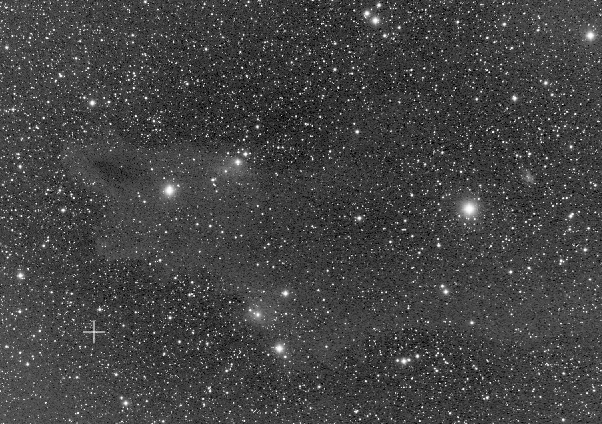


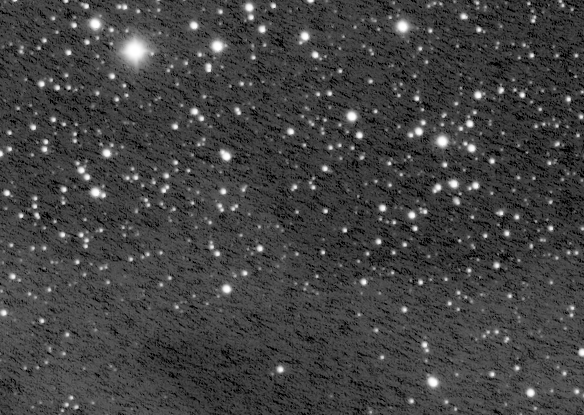
and here is some detail:

Here is the integration from WBPP
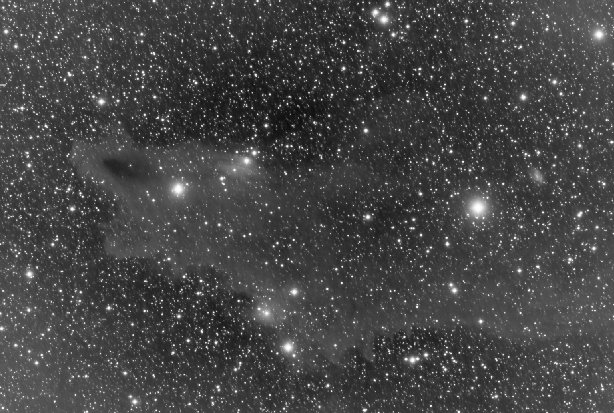


and detail:
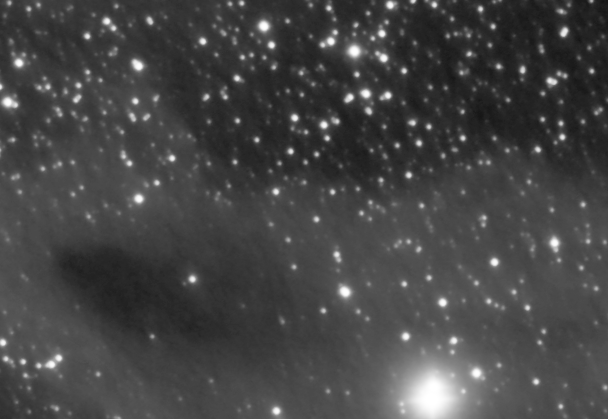


Again, I know that I can just use WBPP but for my understanding ... is there some setting that could make the APP results more like the WBPP results or is there something inherent to the programs and their algorithms that gives WBPP a fundimental advantage here

thanks
Helpful Engaging
Mike H - Sky View Observatory avatar
I know it's not the same thing but I used to use Deep Sky Stacker for a couple of years before I finally decided to learn and use Pixinsight. I immediately saw a big improvement using WBPP. I even went back and reprocessed some old data. No comparison as WBPP was so much better. Probably won't help you but WBPP yields better results, IMO of course. 


Mike
Bill McLaughlin avatar
Best guess is that somehow APP is over subtracting darks but I know nothing about APP, just PI and even then I don't use WBPP, rather do all calibration manually. Not a fan of the black box approach. Just basing this on general appearance.
Sean Mc avatar
It’s hard to directly compare, but it looks like the APP stars are better. By any chance was your target drifting across the session or were you dithering in one axis?
Well written
Mark Savan avatar
Sean Mc:
It’s hard to directly compare, but it looks like the APP stars are better. By any chance was your target drifting across the session or were you dithering in one axis?

No dithering on this and my guiding numbers were good so I don't think that there was any significant drifting
Dave Rust avatar
Any chance that you are using drizzle interpolation on APP? This looks a bit like over sharpening from that process.

On the (6) INTEGRATE tab in APP, make sure the mode at the bottom is on "Interpolate" instead of one of the drizzle options.

Drizzle can create nice results, but it takes some experimenting to get the droplet size adjusted well. On my rig, 2.2 seems to be the sweet spot. Lower numbers emphasize micro detail too much. Bigger numbers make larger structures more exaggerated,.
Helpful Insightful Respectful Concise
Mark Savan avatar
Dave Rust:
Any chance that you are using drizzle interpolation on APP? This looks a bit like over sharpening from that process.

On the (6) INTEGRATE tab in APP, make sure the mode at the bottom is on "Interpolate" instead of one of the drizzle options.

Drizzle can create nice results, but it takes some experimenting to get the droplet size adjusted well. On my rig, 2.2 seems to be the sweet spot. Lower numbers emphasize micro detail too much. Bigger numbers make larger structures more exaggerated,.

Thanks for that input.  I didn't use drizzle on this one with APP ... but that is good food for thought on other integrations where I do use it
Tony Gondola avatar
I seem to see some walking noise in your samples which is weird if there was no drift.
Peter Maasewerd (pete_xl) avatar
I have been working with APP for years and am also familiar with WBPP. We have never noticed any significant differences between the results of the two programs. In particular, I have never seen artifacts like the ones in your picture in hundreds of  own integrations. I have not heard of others having such problems either. In my opinion, it is individual causes that lead to the results you report here. 

Is the phenomenon reproducible? Does it also occur with other data sets?
Well written Respectful Concise
Mark Savan avatar
It only happens with broadband data from an older CCD camera that I sometimes use (SBIG-8300).  It is most prominent with Lum data but I also see it on RGB.  I don't see it with narrowband data from the CCD or from any data from my CMOS cameras.
Well written
Related discussions
Dark vertical streaks in stacked image
I've been struggling with trying to understand the source of these streaks I see in some recent stacked images. I'm hoping someone here can offer an idea as to what the source is. I'm hoping it's not the camera itself. My set up is a ...
Dark vertical streaks in stacked image — troubleshooting stacking quality issues similar to author's concerns.
Aug 21, 2025
WBPP Stacking generates Black and White result from OSC Light frames
Have faced a peculiar issue during WBPP Stacking in Pixinsight for two sets of of light frames . Others seem to work fine I have a OSC ASI 533 MC Pro along with Askar SQA 55 and my recent exposures of M42 and NGC 1499 have generated a black and white...
WBPP Stacking generates Black and White result from OSC Light frames — directly addresses WBPP stacking problems in PixInsight.
Mar 24, 2026
Problems with stacking a Galaxy in Pixinsight
Hey guys, i am still a total noob regarding pixinsight. last night I imaged the pinwheel galaxy for a few hours with my duo narrowband filter. the individual frames looked good but the stacked picture I get out of pixinsight is absolutely unusable. I...
Comparing APP versus WBPP stacking results directly addresses author's software choice question.
Feb 22, 2023