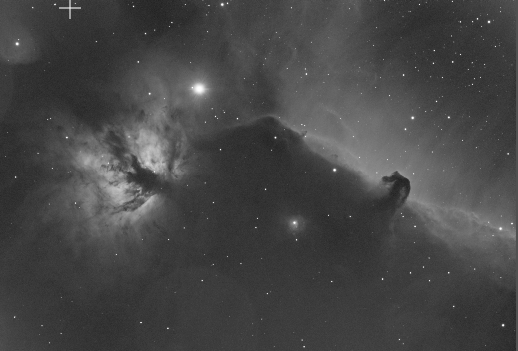
What are the circles in my image after WBPP in Pixinsight?

Jens
24 replies1.4k views
Trinna L. Cuellar avatar
I have checked through all my lights in blink, master dark and the master flat and I do not see these circles there. I am flummoxed. Any thoughts as to what might be causing them? I don't see this in my LRGB frames. 
Marcelof avatar
It is difficult to notice the circles in the image and we also need more information, such as what camera you are using.

But since this is the Horsehead Nebula, one can try to guess. This one contains Alnitak, the number one astrophoto killer. This bright star causes all sorts of weird effects in our images, especially notable is the microlensing effect typical of ASI 1600. But you can also occasionally see something similar with other cameras, depending on the particular optics of your telescope, what filters are being used, etc.

In short, the culprit seems to be Alnitak. If you pay attention, the circles seem to surround it.
Well written Helpful Insightful Engaging
Trinna L. Cuellar avatar
Hi Marcelo, 

Thank you for taking the time to take a look. I appreciate your thoughts!
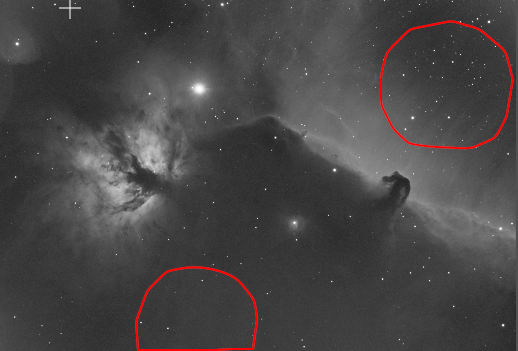
I'm sorry for the lack of details. This was shot with an asi294mm pro on an FLT132. This is the master HA light; subs were 300 secs, and I saw some circles in the upper right and bottom left off-center. Here's a better screenshot so people can better see the circles: 
Helpful Respectful
andrea tasselli avatar
The "circles" are a "ghost" reflections from Alnitak, mostly, as well from other bright stars either off or on -field. They could probably be orginated by the Ha filter reflecting light back into the image train (so their images is significantly out of focus hence appearing as faint circles). Sometimes this is also due to the said filter being slightly tilted w.r.t the optical axis. Assuming it has been positioned correctly in the first place.
Jens avatar
That does look a lot like lens flaring from a bright star. I've had problems with flaring too when I photographed the Horsehead Nebula. 
At the end that all comes down to the optics that you have. It's really hard to remove them in post, especially when they are so ghost like like in your photo.
Somewhere in your imaging train the light bounces back and forth inbetween the glas which causes that. could be the filter, could also just be the lenses in your scope.
Helpful Concise
Jason Coon avatar
Can you post or link to a higher resolution image?  This is a thumbnail image, really difficult to even see what you are referring to.
Well written
Wayne Arnold avatar
I would have guessed due to dust and if flats were used. But interesting note on lens flaring, interested to see how this thread progresses.

Wayne
Jens avatar
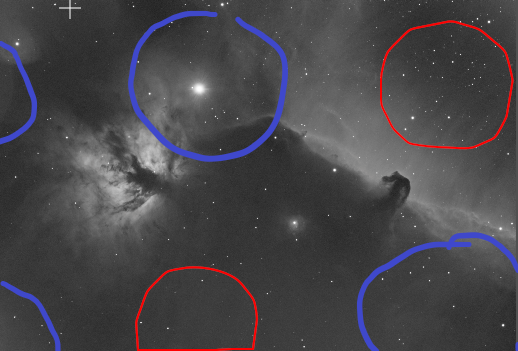
Hold on, I take my comment back!  it's not just one circle it's 6 circles distributed evenly throughout the image. That looks really funky but I have seen this before in another post. I'll send you the link as soon as I've found it.
deleted avatar
Trinna L. Cuellar:
Hi Marcelo, 

Thank you for taking the time to take a look. I appreciate your thoughts!
I'm sorry for the lack of details. This was shot with an asi294mm pro on an FLT132. This is the master HA light; subs were 300 secs, and I saw some circles in the upper right and bottom left off-center. Here's a better screenshot so people can better see the circles: 

Hello ! (and happy new year !)

Theses things ?


It seems to be some artifact due to flat (or maybe some of your data have this kind of artifact). It's really faint, pretty sure you can deal with it using "Normalize" in the DBE process.
Arthur Fernandez avatar
These are normally phantom circles that appear on the Master Light even if flats were used to calibrate the final image (often happens when dew appears between the end of an imaging session and then taking flats). This could also be due to Alnitak, as others have suggested. Regardless, there is a way to fix this. I recommend a couple of YouTube videos that can address this problem. Check out the following two: “Pixinsight- Synthetic Flats can Save Your Images” and “Synthetic Flats Pixinsight tutorial #1”.
Well written Helpful Insightful Concise Engaging
Jens avatar
Trinna L. Cuellar:
Hi Marcelo, 

Thank you for taking the time to take a look. I appreciate your thoughts!
I'm sorry for the lack of details. This was shot with an asi294mm pro on an FLT132. This is the master HA light; subs were 300 secs, and I saw some circles in the upper right and bottom left off-center. Here's a better screenshot so people can better see the circles: 

Hello ! (and happy new year !)

Theses things ?


It seems to be some artifact due to flat (or maybe some of your data have this kind of artifact). It's really faint, pretty sure you can deal with it using "Normalize" in the DBE process.

I think there are even more. Rather faintly but they do show up.


Here is the post from someone else 

https://www.astrobin.com/forum/c/astrophotography/deep-sky/unusual-ghosting-pattern/
deleted avatar
Jens:
I think there are even more. Rather faintly but they do show up.


Oh yes! You're better than I at finding faint object (and drawing circle)
Dale Powell avatar
Check out this Cloudy Nights thread:
https://www.cloudynights.com/topic/671195-how-to-interpret-halo-size/
It show how to use halo size to estimate which lens element is the source of the reflection.
Dale Powell avatar
Or use the Astronomy Tools dust-reflection Calculator:
https://astronomy.tools/calculators/dust_reflection_calculator
Jonny Bravo avatar
It's reflections from your optics and sensor. They happen, especially with extremely bright targets / stars. For example, here's my own Ha data of Orion with the circles:


Completely uncalibrated data stack of 10 x 180s subs taken with my 294MM using Chroma 3nm Ha and strapped to a GT81.
Helpful Concise Engaging
Paul O’Brien avatar
I had the exact problem in an Ha master image of IC63, the Ghost of Cassiopeia.  I tried everything, including integrating my lights without ANY calibration frames, and those same large circles showed up.  Given the comments in this thread, I'm going to assume it was due to the superbright nearby star Gamma Cassiopeia.  Good info.
Well written Insightful Respectful Concise Engaging
Chris Ashford avatar
Trinna,

did you take SII and OIII subs too? If so, any sign of circles in those?

The circles are large and certainly the sort of size you might expect for reflections of a large star internal to your image train. 

However if they were filter-related reflections I’d expect them to be centered around Alnitak and that doesn’t seem to be the case. 

When in the shooting sequence do you take your flats? Is it possible that some dust was removed between shooting your Ha lights and your Ha flats?

Here is a link to an article on filter-induced halos - it is mainly focused on OSC imaging, but the principles apply to mono imaging equally well:

https://www.cloudynights.com/topic/852416-understanding-filter-induced-star-halos/

I hope this helps smile
Well written Helpful Insightful Respectful Engaging Supportive
avik.basak avatar
If you are not noticing the artifacts in the LRGB but only in the NB images check if you set output pedestal value in wbpp. I had weird banding in my NB images and need to set a value of 150 to get rid of those. There is a video from Adam Block where he explained it but i don't have it handy.
Helpful
Jon Talbot avatar
Hi,

Yes these are ghost images of most likely Alnitak.  Alnitak has one around it too.  They are spread across the image in a grid pattern as Francois indicated.  They are usually much easier to detect if you run an AI star removal algorithm like SXT or StarNet.  Cloudy nights has several threads on the cause of this as well as Astrobin.   The theory is that it's caused by micro lens reflections and the intensity sometimes can be stronger or weaker depending upon how your filters are oriented.   I have seen this with my ASI 6200 and Chroma or Astrodon filters using a refractor when a very bright star is in the FOV and the exposures are long.  Typically its more prevalent when using  Ha or OIII filters.   When I measured the size of the reflections, the distance from the chip was the distance to the filter.  As mentioned, basically light bounces off the filter and back to the chip.  When using broadband RGB filters they do not show up, most likely because the exposures are much shorter and the bandwidth is much larger.   You may want to try and flip your filters over and see if it makes a difference.

How to get rid of them in post processing can be challenging.  I typically produce a starless image and create circular masks matching the grid pattern using the Game script, which you can install.  Once the mask is made and blurred I subtract out the added signal with the mask applied very slowly using pixel math.  Its incredibly tiny amounts of subtraction on the linear image and often takes several tries and several different masks as sometimes one side of the reflection is a bit brighter than the other. 

Here is an example of IC 63 where the mag 2 star Navi caused a grid pattern of ghost reflections.  This is a Ha image of 5 min.  
Helpful Engaging
Ron Crouch avatar
I think that the diameter of the reflections tell us the distance to the reflecting body.  ccdware.com used to have a nice dust-donut calculator which could be used. Pesky photons!
Enrique Ojeda avatar
Jonny Bravo:
It's reflections from your optics and sensor. They happen, especially with extremely bright targets / stars. For example, here's my own Ha data of Orion with the circles:


Completely uncalibrated data stack of 10 x 180s subs taken with my 294MM using Chroma 3nm Ha and strapped to a GT81.

Ohh! What steps do you take in PixInsight to remove those circles? I would appreciate your response please. Thanks and clear skies.
Well written Respectful
Jonny Bravo avatar
Enrique Ojeda:
Ohh! What steps do you take in PixInsight to remove those circles? I would appreciate your response please. Thanks and clear skies.


I didn't... ended up abandoning the project. I tried flipping the filters, but that had no impact. I tried setting pedestals, again with no impact.

I'm betting somebody good with clone stamp could manage something. Or maybe using a healing brush or similar in Photoshop would work (I'm even worse in PS than I am in PI LOL).
Tom Boyd avatar
Jon Talbot:
How to get rid of them in post processing can be challenging.  I typically produce a starless image and create circular masks matching the grid pattern using the Game script, which you can install.  Once the mask is made and blurred I subtract out the added signal with the mask applied very slowly using pixel math.  Its incredibly tiny amounts of subtraction on the linear image and often takes several tries and several different masks as sometimes one side of the reflection is a bit brighter than the other.

This is the approach I would try too. Much easier on a starless image. Instead of using pixelmath, however, you may simply want to adjust the midpoint of the masked image using HistogramStretch. That way you can see the impact you are having in real time. This is the process I typically use to deal with star halos...
Well written Concise
Tony Barlow avatar
Trinna L. Cuellar:
I have checked through all my lights in blink, master dark and the master flat and I do not see these circles there. I am flummoxed. Any thoughts as to what might be causing them? I don't see this in my LRGB frames. 

Perhaps it might be worth your time to take images of a bland area of sky using the same settings and processing. It would confirm or eliminate many of the suggestions.
Well written Insightful Respectful Concise
Pawel Piechnik avatar
Trinna L. Cuellar:
I have checked through all my lights in blink, master dark and the master flat and I do not see these circles there. I am flummoxed. Any thoughts as to what might be causing them? I don't see this in my LRGB frames. 

You mention a single master flat. Didn't you take flats separately for each filter ? those circles most likely are (filter?) dust.
Concise
Related discussions
Flat Darks prep and use in PI
Recently, I switched from the ASI 2600MC to the ASI2600 MM Pro with LRGB filter wheel. It's been a complicated journey for sure. Im trying to figure out dust motes, flats etc and was really stumped. I often find numerous dust motes in my my linea...
Switched to ASI2600 MM Pro with LRGB filter wheel; discusses calibration issues.
May 25, 2025
Issue with flat frames
Hello everyone, I need some advice about flats. A few months ago, I switched to a monochrome camera with an IMX571 sensor (ToupTek ATR2600M), paired with a ToupTek filter wheel and Antlia LRGB filters. As my main telescope, I use an Askar 103 APO. I ...
Monochrome camera with calibration frames; addresses flat frame problems.
May 6, 2025
Problems generating my flats
Hi! Does anyone know why my flats shots have two circles in the center of the image? My equipment is a WO RedCat v3, and in the optical train I have a ZWO filter drawer, a filter wheel, and my ASI 294mm Pro camera. I have the filter drawer because I ...
Circles appearing in flat shots; directly matches the mysterious circles issue.
Aug 5, 2025
Issue in frames calibration?
Hi everyone, this is a long post, but it’s needed to provide proper context. Thanks in advance to anyone willing to read through it and help me figure things out! I’ve been struggling for days with what seems to be a calibration issue (or possibly a ...
Frame calibration issues; may help diagnose calibration-related circle artifacts.
Jul 8, 2025